
[Training a 500B LLM from Scratch] 14/25: How Do We Install the Software on Our First Server?
The material has a home, and training progress has a place to be saved. I log into the first eight-B200 server to have it read a small sample. A terminal command must pass through an entire software stack before it reaches a GPU. All 640 machines will need that stack, so the first installation becomes the starting point for the rest.
Keep the goal small: train a few steps, save, close the process, then continue from the saved point. Once that route works, copy the environment to other servers. When 5,120 GPUs train 500B, at least differences between installations will not obscure where a problem began.
I place the software list beside that small task. Each component needs to remove a concrete obstacle. That makes both its purpose and its acceptance check clear.
Who Handles a Training Command on Its Way to the GPU?
There are many names, so follow the task. Ubuntu and the driver make hardware usable. Slurm allocates machines, and Pyxis with Enroot starts the selected environment. Within each training step, Megatron organizes the work, PyTorch computes and differentiates, GPU libraries perform calculations, and NCCL exchanges results. Provisioning tools reproduce the validated underlying environment on the remaining machines.
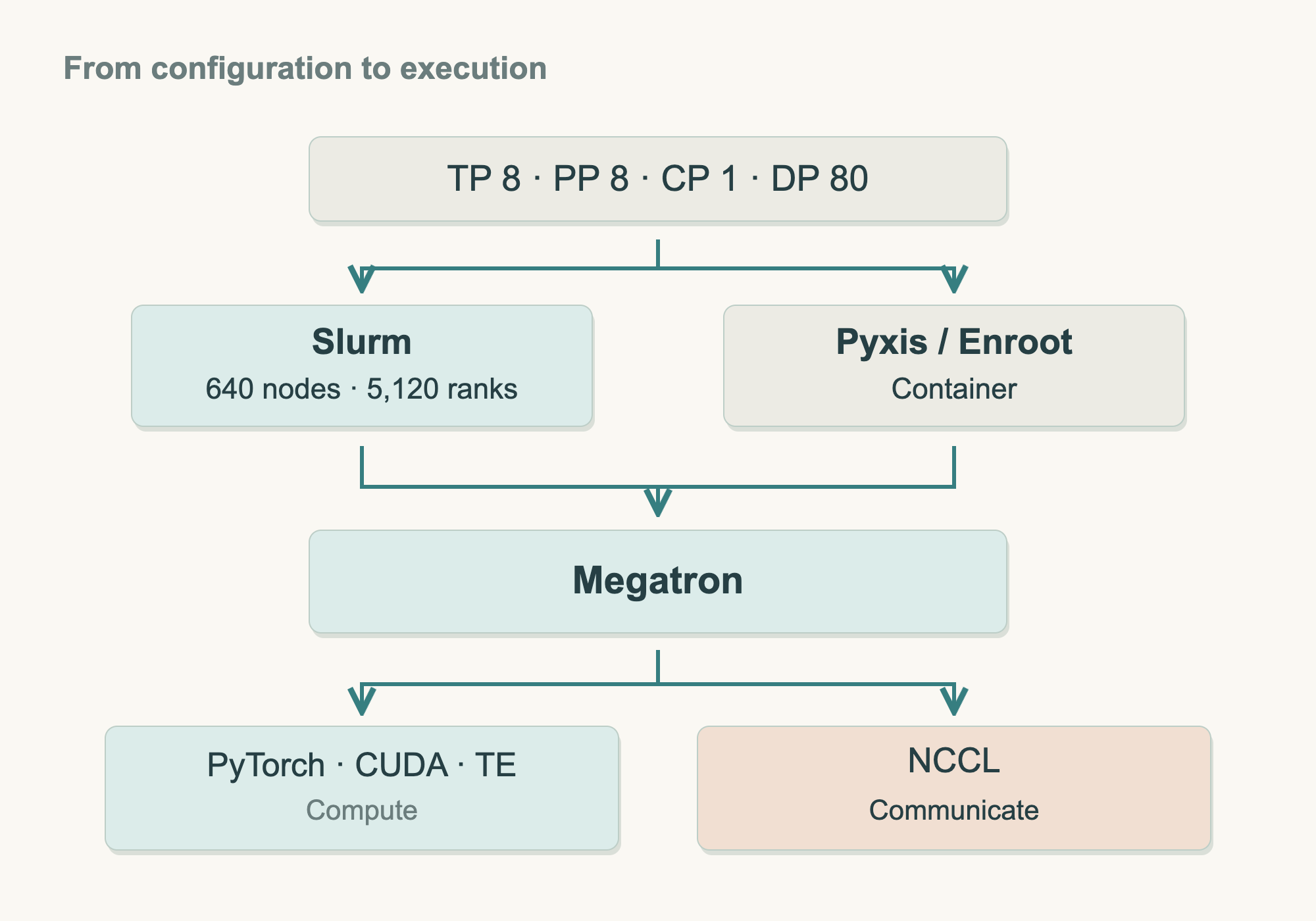
The diagram first answers who does what. Read downward as the task reaches the GPU. The next article opens up the parallel configuration. Here, we start by making the first machine usable, then connect the complete software path.
First, let the machine recognize its eight GPUs
First, the operating system must recognize eight GPUs. I choose the server manufacturer's supported Ubuntu combination, fixing the operating system, kernel, GPU driver, and internal-interconnect services together. Ubuntu manages hardware and programs; the other components let it use the B200s and their connections correctly.
A custom Linux installation offers more freedom over components and update timing, along with responsibility for compatibility testing. This uniform hardware fleet primarily needs a reliable combination and a clear maintenance path. I accept the supplier's version constraints and reserve the effort for training and fleet operations, giving all 640 machines the same starting point.
The support list must name the purchased model. NVIDIA's DGX OS support table lists DGX B200 requirements. Our own system also needs its corresponding list, installation media, and reinstall procedure, with exact versions confirmed during procurement acceptance.
Check preinstalled systems against that list; reinstall from the same list when needed. Ubuntu's apt downloads and installs packages and records dependencies. I point it to the supplier's or NVIDIA's official repository and specify versions. Automated provisioning will repeat these explicit steps.
NVIDIA's driver deployment documentation also recommends package management for driver branches, updates, and companion software. The standalone .run installer allows more direct control. We choose fixed repositories and packages to make installation repeatable and its records inspectable.
After installation and reboot, run nvidia-smi and take attendance: all eight B200s should appear healthy. Then check their connections. B200 uses fourth-generation NVSwitch. Install Fabric Manager and NVLink Subnet Manager according to the official documentation and the system's supported combination, and inspect services and links. Device recognition and connectivity both have to pass.
The system now has a way to recognize eight cards and inspect their interconnect. The next obstacle is clear: who turns the training written in Python into work on those cards?
Kernel: The core of an operating system that directly manages hardware resources and coordinates running programs.
GPU driver: Software that lets the operating system interact with the GPU, including managing memory, computation, and the device itself.
Package manager: A tool that downloads, installs, and updates software and records its dependencies. Ubuntu uses the
aptpackage manager.
Fabric Manager: A service that manages GPU interconnections inside the server. On B200 systems, it works with NVLink Subnet Manager.
NVLink Subnet Manager: A service involved in managing the NVSwitch connections in a B200 server.
The GPUs Are Visible. How Does Python Use Them?
The training program reads tokens, predicts, and adjusts parameters from its errors. Python describes that process. A set of computation tools must take over the large amounts of arithmetic and differentiation.
I use PyTorch to organize model computation and gradients. It calls the CUDA runtime and GPU libraries, reaching the B200 through the driver. Matrix multiplication, for example, can use cuBLAS. Keep the calling sequence in view:
Training program → PyTorch and GPU computation libraries → Driver → B200
Installing each tool separately can produce this environment, but leaves every version relationship for us to check. An official training container provides the prepared combination. A container is the program's separate runtime environment; an image is its template. Give the next machine the same image, and its training program starts from the same software.
PyTorch: A framework that helps us define models, perform computations, and calculate gradients.
CUDA: NVIDIA's GPU computing platform. Here, we mainly use its runtime and computation libraries to run calculations on the GPU.
Container image: A template containing a program and the software it depends on, used to create a container's runtime environment.
Docker starts the container on the reference machine. Seeing a GPU on the host does not yet establish access inside, so follow the NVIDIA Container Toolkit installation guide: prepare the driver and Docker, add the toolkit, configure GPU access, then count the eight cards again inside a test container.
Going inside and outside also separates responsibilities. Host system and driver handle hardware; Python, PyTorch, and libraries in the container support the program. Training changes mainly replace the image, while the host remains on its approved combination.
Computation inside the container still needs the material outside it. Mount Part 13's material and checkpoint directories so reads and saves have actual destinations. Closing or replacing the container leaves those files, and the training progress, in external storage.
Docker: A tool for building container images and starting containers. Our plan uses it to build images and troubleshoot on the reference server.
NVIDIA Container Toolkit: Tools that let containers use the server's NVIDIA GPU devices and driver capabilities.
Who Connects the Basic Computation into a Training Run?
The basic computation is ready, but 500B training also needs model construction, saving, recovery, and multi-GPU collaboration. I choose Megatron Core and the training code in the matching Megatron-LM version, then add our project implementation and configuration.
Start with the official release's build recipe, preserve its base container and dependencies, add the project changes, and produce our own training image. Each modification has a record, and the original combination remains traceable.
An extra Python package is convenient during development. Before deployment to 640 machines, it must go into the recipe and produce a new image. Follow upstream uv and lockfiles. uv sync --locked builds the locked environment, stopping with an error when declarations do not match. Version conflicts are resolved during the build.
Manual installation retains its place in development. A unified build delivers the production environment. Maintaining build, version, and acceptance records costs work, but gives every machine the same verifiable artifact.
Megatron Core: A library of components for large-model training. The training program connects its model, parallel-computation, and checkpoint components into a training run.
Lockfile: A file recording the dependency versions selected for a project, used to recreate the same dependency combination.
Read more: the selected versions and build process
As of October 29, 2026, this plan retains the released Megatron Core 0.19.2 and uses the official container build file under the same tag. The file starts from nvcr.io/nvidia/pytorch:26.06-py3 and provides locked dependencies.
The 26.06 container release notes list Ubuntu 24.04, CUDA 13.3.0, and PyTorch 2.13.0a0+8145d630e8. Here, Ubuntu refers to the user space inside the image. The host operating system still follows the server manufacturer's support list. Megatron's recipe sets NCCL to 2.30.7-1+cuda13.3 and handles other dependencies.
Fetch the Megatron-LM repository, check out core_v0.19.2, and record the complete result of git rev-parse HEAD. Build the dependency environment using the main stage in that version's docker/Dockerfile.ci.dev, then add the training code from the same commit to the final project image. We can name the project image shan-training:mc0.19.2-cu13.3. NVIDIA's base-image name remains unchanged.
Before installation, check the container release notes for CUDA driver requirements, the server manufacturer's support range, and known issues. Save the base-image digest, build arguments, lockfiles, build logs, and final image digest. This is our selected baseline for acceptance testing. We will expand it to other servers after the single-server computation, communication, and recovery checks pass.
Read more: what do pip, venv, Conda, and source builds do?
pip installs Python packages. venv creates a separate project environment so that different projects keep their packages apart. Conda can also manage software through environment definitions. All of these tools can support development. Our production build follows the upstream uv and lockfile approach so that we maintain one dependency definition.
When adding a package, check whether it would also replace PyTorch or another core dependency in the official combination. The server's system installation process continues to manage the driver.
To change a training implementation or compile a custom GPU operator, fetch the selected source version, build it with matching CUDA Toolkit and compilation tools, and add the result to the project image. Record the installation steps in a Dockerfile and the full source commit so that another colleague can find the same code and build method.
Python virtual environment: An environment that keeps Python packages separate for one project.
Operator: A computation in a program, such as matrix multiplication. Its GPU implementation is commonly called a kernel.
CUDA Toolkit: NVIDIA's GPU development toolkit, including a compiler, runtime, and related tools and libraries.
Dockerfile: A file that records the steps for building a container image.
Commit ID: A unique identifier for a particular change in a code repository.
Run a little training, then check that it can resume
Installed components may still fail to work together. I take a small model and fixed material and turn the original goal into four checks, giving problems a chance to appear on the first machine.
Check devices first: eight healthy B200s on the host, then the same devices inside the container. This separates hardware-access problems from model code.
Next, check computation. Solve a known-answer problem on one GPU, then run the small model through prediction, gradients, and an update. Inspect numerical values, gradients, and parameter changes. Include the BF16, attention, and fused operators planned for the real run so the small test exercises the actual computation path.
BF16: A floating-point format that uses two bytes per number. This plan uses it for part of the training computation while keeping higher-precision state where needed.
One card computes, but how do eight prove they can cooperate? Give them the values 1 through 8, sum them, and return the same answer to each. Every card should receive 36.
NCCL performs this AllReduce. The program specifies data, and the communication library executes the operation, inside a server or across machines, as described in the NCCL overview. Once the small sum agrees, test several larger data sizes and retain timings and logs as references for the remaining servers.
AllReduce: Combine values from the participating devices, then give the combined result to each device. Our example uses summation.
NCCL: NVIDIA's GPU communication library, which performs operations such as reduction, broadcast, and gather.
Finally, connect saving and recovery. Read actual-format token files from Part 13's directory, schedule 100 steps, write a checkpoint at step 50, and close the process. A new process must use that checkpoint to continue to step 100.
The new process matters. Parameters, optimizer, step count, random state, and data position must return from the saved files so material order and learning rate continue correctly. PyTorch's save/load tutorial likewise distinguishes weights from recoverable training state.
Run another 100 steps continuously as a control, fixing environment, material order, and computation settings. Compare key states and numerical differences against a tolerance established before testing. Check the effects of floating-point operations and GPU kernels using PyTorch's reproducibility guidance.
The first machine becomes a reference only after all four pass. Devices, computation, communication, and recovery now have evidence for rollout. Actual 500B throughput and full 7TB checkpoint writes remain for larger-scale acceptance.
Who Assigns Machines and Starts Jobs Across 640 Servers?
A program can start directly on the reference machine. Across 640 servers, machine ownership, start times, and failures need one organizing system. Before copying environments, assign responsibility for jobs.
I choose Slurm. A job requests its node group, then starts and monitors processes after allocation. Small tests also queue for resources, with use recorded by account. These are the allocation, parallel-job management, and queuing duties in Slurm's overview.
The fleet's main job is long-running synchronous 500B training: GPUs compute together and continually exchange results. Slurm organizes resources around these parallel jobs, fitting the dedicated fleet. Controller services, node services, accounting, and failure handling belong in the operations handover.
Kubernetes also organizes distributed training. Its advantage is a common platform for training, online inference, and multiple teams' applications, especially where an established team already operates it. Our main fleet is dedicated to training, so mixed-service benefits are smaller. We select Slurm and maintain that path, while computation and communication tests establish actual speed.
Slurm: A scheduler that allocates compute resources to cluster tasks and handles queuing, startup, and monitoring.
Kubernetes: A platform for managing containerized workloads, with capabilities that can be combined for services, batch jobs, and distributed training.
Allocated machines still need running containers. Pyxis connects container jobs to Slurm, and Enroot supplies the environment. Submission then runs the chosen image on the assigned nodes.
Docker handles reference-machine builds and troubleshooting. Production runs through Slurm, Pyxis, and Enroot, so the same acceptance checks must pass through that path too. After verifying GPUs, directories, communication, and recovery, pin the source image by digest, retain a checksum for its imported artifact, and distribute it to the nodes.
Pyxis: A plugin that connects container tasks to Slurm.
Enroot: A tool that imports container images and runs them as user-space environments.
Image digest: An identifier derived from image content, used to confirm that we retrieve the same image.
Read more: how do other platforms work, and what would we maintain?
Kubernetes can use Kueue for queues and quotas and Kubeflow Trainer to organize distributed training. GPU Operator can manage GPU drivers, Container Toolkit, device plugins, and monitoring components. Administrators also need to coordinate component upgrades and the permissions, quotas, and isolation of a shared cluster.
The benefit is reuse of a common application platform. Its maintenance scope also includes the selected queue, training controller, networking, and device integrations. Our plan chooses Slurm and manages host software through a common installation recipe.
Apptainer is another container tool with GPU support, suitable for computing centers that adopt it as their standard runtime. Our production environment uses Pyxis and Enroot so that we maintain one launch method. The official Pyxis documentation requires it to match the deployed Slurm version. That relationship must also appear in the version record.
Kueue: A queuing and quota-management system on Kubernetes that decides when a task is admitted to run.
Kubeflow Trainer: A component that organizes distributed model training on Kubernetes.
GPU Operator: A tool that automatically manages GPU-related software components on Kubernetes.
Install every machine from the same recipe
With launching selected, each empty machine needs to become the reference machine. Two things must be reproduced: its underlying system and the project image.
Retrieve images from the team registry; build the host from one automated recipe. Keep the supplier-supported Ubuntu combination fixed while PXE, Ubuntu autoinstall, cloud-init, and Ansible take turns:
| Installation step | Tool | Result |
|---|---|---|
| Fetch a startup program over the network | PXE | A machine with empty disks can enter the installation process |
| Install Ubuntu from configuration | Ubuntu autoinstall | Disks and the operating system are ready |
| Set each machine's own information | cloud-init | Hostname, network, and users are ready |
| Install fixed software and configure services | Ansible | The same drivers, services, and runtime tools, with execution records |
The steps correspond to the official guides for Ubuntu autoinstall, cloud-init, and Ansible. Keep one common recipe, supply per-machine addresses and identities separately, and archive validated images and packages for reinstall and rollback.
An integrated platform is another option. NVIDIA Base Command Manager brings nodes, images, distribution, and updates together, reducing the work of connecting tools while adding responsibility for that platform and its integrations.
We select the separate-tool combination. Infrastructure staff within the 20-person team work with the integrator to deliver the recipe, reviewing versions, configuration, and acceptance together. Installation orchestration, logs, and records are explicit deliverables. We must connect the tools, but every machine has one authoritative recipe to trace.
PXE: A way for a server to obtain a startup program over the network.
cloud-init: A tool that initializes a system according to configuration.
Ansible: A tool for installing software, configuring services, and managing servers in batches from configuration.
How Do We Preserve This Working Environment During the Next Upgrade?
Roll out to a small group first. Check each machine's devices, computation, and internal communication. Repair and retest failures before admission, then expand in batches. Cross-machine communication and aggregate performance enter cluster acceptance, so installation problems need not wait for 640 simultaneous starts to appear.
Upgrades follow that same path. Changed code or dependencies produce a new image, tested on the reference machine with short training and recovery, then on a small group before wider rollout. Keep the old image in the registry so the previous version remains reachable.
A version label alone is insufficient. Docker's documentation notes that a tag can point to changed content. Tags aid recognition; digests fix the artifact. Each update produces a new artifact and digest, verified before use, leaving the environment's changes traceable.
Kernel or driver updates get maintenance windows, restorable system images and packages, and fresh acceptance after reboot. Rolling back training software also requires checking that the old version reads the intended recovery checkpoint. The software and progress must both return.
The next engineer receives a repeatable procedure: install from records, retrieve the specified image, mount material and checkpoint directories, run the same tests, and judge them against the acceptance criteria.
Read more: which records belong in the environment handover?
| Record | Purpose |
|---|---|
| Hardware, firmware, operating-system, kernel, and driver versions | Identify the machine and its underlying software conditions |
| Management services, container tools, packages, and configuration | Reinstall the same system and production runtime |
| Training-code commit, dependency lockfile, and build recipe | Retrieve the program and build method used at the time |
| Source-image digest and imported-artifact checksum | Retrieve the same training environment |
| Training configuration, tokenizer, sample data, and checksums | Repeat the same training sample |
| Launch commands, directory locations, pass criteria, and test logs | Let a colleague repeat the procedure and judge the result |
| Previous environment and checkpoint-compatibility records | Restore training if an update causes a problem |
Repeatable installation, identifiable contents, automated acceptance, and recovery after updates make this 2026 setup suitable for long-running training. Success on the first machine now has a replication path, and failure has a way back.
The reference machine still ran a small model. Replacing it with 500B puts even one copy of the weights beyond a single GPU. The software is ready. Next, we must tell it how one model is divided across 5,120 cards.
New ideas, straight to your inbox.
AI, engineering, and experiments. One or two useful emails a month.
No spam. Unsubscribe anytime.