
Building an Enterprise Agent Harness from Scratch4/10: Why Do Tools Make an Agent More Dangerous?
The procurement agent now has three tools: query vendors, create a purchase request, and send a request-for-quote email. The user says only, “Compare these three first. Do not place an order. Ask for any missing information.”
After looking up the vendors, the agent wants to “save” its comparison and selects create_request. Every argument is valid, and the tool returns success. A few seconds later, a real purchase request appears in the approval queue.
The model did not omit a field. It misunderstood the word “request.” One ambiguous name turned a mistaken interpretation into a real database record.
A Tool Must First Explain What It Will Change
A person who sees create_request may know the company’s internal naming and understand that it starts a purchase. The model can judge only from the name, description, and parameters. If the name is vague and the description says only “create request,” the model cannot reliably distinguish creating a purchase request from saving a comparison draft.
I split it into two single-purpose tools. save_supplier_comparison_draft saves only an internal draft. create_purchase_request creates a business object that enters the approval queue. The contract for the second tool also defines its version, side effects, required permissions, approval rules, idempotency requirements, and result states.
The purchase request needs strict arguments. A vendor ID is the unique identifier from a verified vendor directory; the model cannot invent one from a company name. The amount uses the smallest currency unit—for example, $42.35 becomes 4,235 cents—to avoid ambiguous decimal arithmetic. The currency comes from an allowed set, and a requirements note cannot replace formal approval. A data schema can reject missing fields and invalid types. The authoritative system must still check which enterprise owns the purchase request, whether the budget is sufficient, and whether the approver is eligible.
Tool contract: The interface agreement that defines a tool’s name, version, purpose, limits, inputs, outputs, side effects, permissions, and error semantics.
Schema: A structured definition of data fields, types, required values, and allowed ranges.
During Comparison, Show the Agent Only Comparison Tools
An enterprise may have hundreds of APIs. Putting all of them into context consumes model input and presents many similar names at once.
The procurement task is still in the “compare vendors” stage. The tool catalog returns only tools for reading vendors, contracts, and quotes, and for sending questions. create_purchase_request does not appear until the user selects an option, the budget passes, and the task enters the execution stage.
This is tool discovery: retrieve only the small set of tools needed for the current agent version, workflow step, user permission, and risk scope. It reduces the model’s choice set, but it is not a security authorization. At execution time, the backend still checks the user’s enterprise (tenant), the specific purchase request, the amount, and the permission for the action.
Tool discovery: Searching for and loading the tools required by the current task.
The Model Proposes an Action; Real Systems Take Over in Layers
A tool appearing in the list does not mean the model may call the real API directly. I divide an action into five stages: discover the tool, propose the intent, check authorization, execute the call, and verify the result. The diagram expands the handoff between authorization and execution into nine steps.
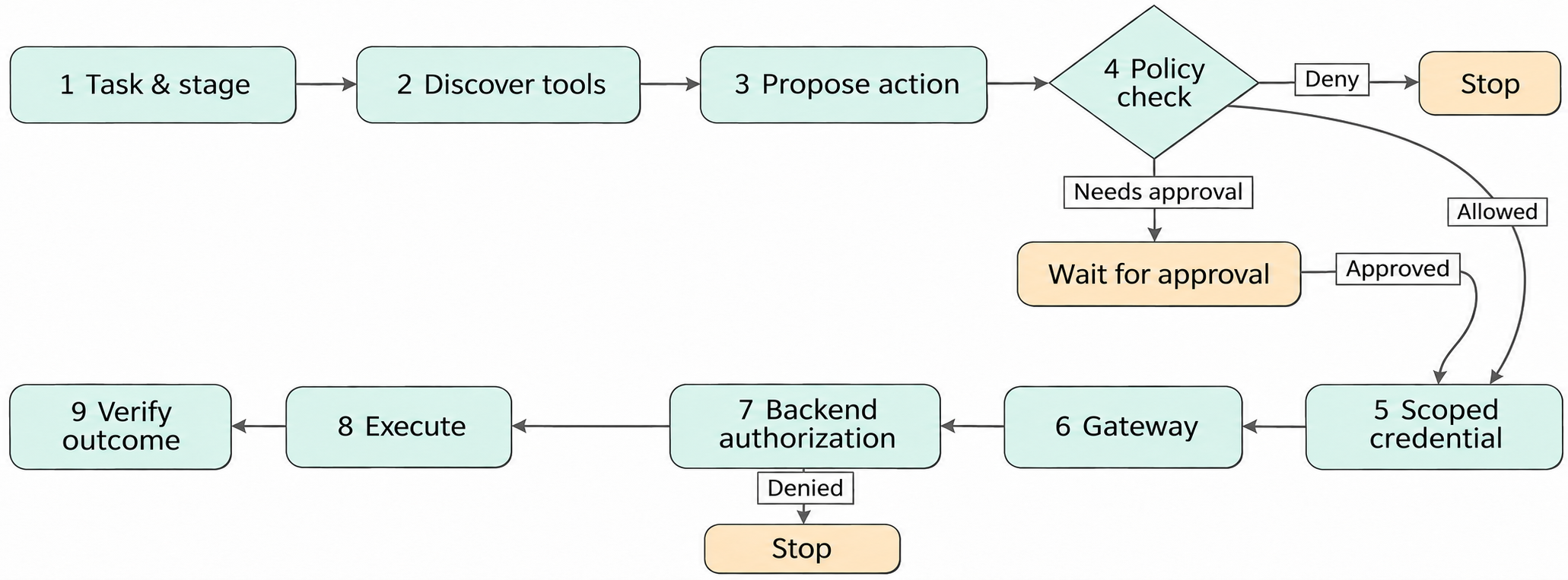
Follow the numbers in the diagram. In the first three steps, the system finds tools for the current task stage and the model proposes an action. At step 4, policy can deny the action, pause for approval, or allow it. At step 5, an allowed action receives a short-lived credential. It then passes through the tool gateway and a second backend authorization. After execution, the flow continues to step 9, where the business outcome is verified.
The agent first submits the tool, arguments, and expected effect. A policy checker examines the task, user, enterprise, amount, and risk. A denied action stops. An action that requires human approval is saved and waits. After approval, a credential service issues a short-lived pass valid only for this purchase request and action. The tool gateway then forwards the call to the business service. This common entry point that checks and routes tool calls is the Action Gateway.
The business service owns the real purchase request and budget, so it performs the final object-level authorization. The “object” is this specific purchase request. Even if a user can usually create purchase requests, the backend must confirm that the user may act on this request for the current enterprise. The gateway performs common checks before the call. The backend checks the business facts it owns. Only after both pass may the call change data.
Action Gateway: The service boundary between an agent and real tools that performs identity, policy, validation, routing, and audit checks.
Accepted Means Only “Placed in the Queue”
After an RFQ email is submitted, the service returns 202 Accepted. This does not mean that the email was delivered. It means only that the request entered a queue. Creating a purchase request may similarly return an operation ID while the backend continues asynchronously. The ID is like a claim ticket: the Harness uses it to ask how far processing has progressed. The ticket itself is not the result.
Tool results therefore need separate states for “more input required,” “accepted,” “still processing,” “succeeded,” “failed,” and “outcome unknown.” On “accepted,” the Harness saves the query ID and polls again at the time suggested by the service. On “still processing,” it continues to wait. On “outcome unknown,” it enters reconciliation. Only after “succeeded” returns the real business object ID does the Verifier inspect the business system for the expected effect.
The state cannot jump directly from “accepted” to complete. It must wait for backend processing and then verify the business outcome. A success string returned by a tool cannot sign on behalf of the business system.
2026 Progress: Gateways and MCP Standardize Tool Connections
Once tools cross team boundaries, writing a separate identity check, router, and runtime record inside every agent produces inconsistent rules. Google Agent Gateway brings user-to-agent, agent-to-tool, and agent-to-agent calls through one governance entry point. The capability became generally available on June 18, 2026. In this procurement pipeline, it carries the caller identity, enterprise, temporary authorization, and observability data to the tool entry point. The procurement service still checks the specific purchase request and budget.
Connection formats create another problem. If the search tool, contract repository, and email service each speak a different “dialect,” the agent application needs a custom adapter for every tool. MCP gives tools from different languages and teams a common discovery and invocation format. The core specification released on July 28, 2026 makes every request carry its protocol version, client identity, declared capabilities, and method. The tool entry point does not need to rely on a long-lived connection state before it can identify and check the caller again.
A shopping cart or browser can still preserve business state. The tool returns a cart ID or browser ID on the first call, and the application sends that ID as a normal argument on the next call. The application can see which enterprise owns the state and authorize every request again.
A long call such as exporting a large report cannot return the final result in one request. The caller needs to query progress, cancel the task, or provide more input. The MCP Tasks extension defines task IDs and states for these actions, but it remained a Draft as of November 8, 2026. It lets the caller ask, “How far has this tool task progressed?” The durable execution layer in the next chapter handles an entire procurement workflow waiting across days, resuming approval, and applying compensation.
MCP: Model Context Protocol, a common protocol for connecting AI applications to tools, data, and other resources.
MCP Tasks: The current Draft MCP extension that uses a task ID to represent queries, cancellation, updates, or waiting for input in a long-running tool call.
Return to the Purchase Request That Should Never Have Been Created
The same instruction—“Compare first. Do not place an order.”—enters the system again. During comparison, the tool catalog does not show the purchase-request tool at all. If someone bypasses discovery and submits the action directly, policy still sees that the workflow stage does not allow it. The backend then checks the purchase request and budget one final time.
What the agent actually needs is a comparison draft and answers to missing questions. It selects the email tool. The schema checks the recipient and content. Policy confirms that external communication is allowed. The tool gateway attaches a short-lived credential. The email service returns a queryable operation ID, and the Verifier waits for a delivery record.
The tool boundary is now clear. But after an email is truly sent, the service may time out and the process may restart. The next chapter continues with this email: how can the task recover without sending it twice?
New ideas, straight to your inbox.
AI, engineering, and experiments. One or two useful emails a month.
No spam. Unsubscribe anytime.