
Building an Enterprise Agent Harness from Scratch3/10: Why Does an Agent Forget Mid-Task?
The refund task in the first two chapters had only a few steps. That was enough to explain finish lines and evidence. To see why an agent forgets, I will take the same Harness into a longer procurement task: compare three vendors, read the requirements, contracts, emails, quote sheets, and security terms, then ask for missing information.
By turn fifteen, the agent remembers a discount from an email but misses a red line on the first page of the task: the data must remain in the United States.
The red line did not disappear. It is still inside the context, buried under dozens of tool results, pricing discussions, and intermediate conclusions. The agent did not lose the sentence. The sentence lost weight in the current decision.
Context Is a Workbench for This Turn, Not a Warehouse
On each model call, the model sees only the material placed in front of it: system rules, the user task, message history, tool definitions, and tool results. If we insert everything unchanged, the pile grows. Cost and latency rise with it, and old mistakes remain inside the pile.
In its official article on context engineering, Anthropic treats context as a finite resource and notes that a model’s ability to retrieve information accurately can decline as input grows. My goal is therefore not to put every document into the window. It is to prepare a small, useful input for the current step.
Context: The information a model actually receives and can use directly in one call.
Context engineering: The engineering process that decides which information enters the context, when it enters, and in what form.
Put Five Kinds of State Back in Their Proper Places
I divide the procurement task’s material into five layers:
| Layer | What it stores for the procurement task |
|---|---|
| Event Log | The complete order of user inputs, model decisions, tool calls, approvals, errors, and results |
| Workflow State | Which vendor is being reviewed, what is missing, and whether the task is waiting for approval |
| Working Context | The small set of materials the model needs for this turn |
| Long-term Memory | Approved preferences or procedures that remain useful across tasks |
| Business Source | The original contracts, quotes, orders, and policies |
Chat messages enter the event log. Workflow state tells us how far the work has progressed. Long-term preferences go into long-term memory. Contracts and data-residency policies remain in authoritative business systems. Consider the rule “data must remain in the United States.” The original clause stays in the contract repository. The retrieval appears in the event log. “Vendor proof is still missing” goes into workflow state. The current turn receives only the relevant clause and proof on its workbench. The working context is no longer a warehouse. It is rebuilt on every turn.
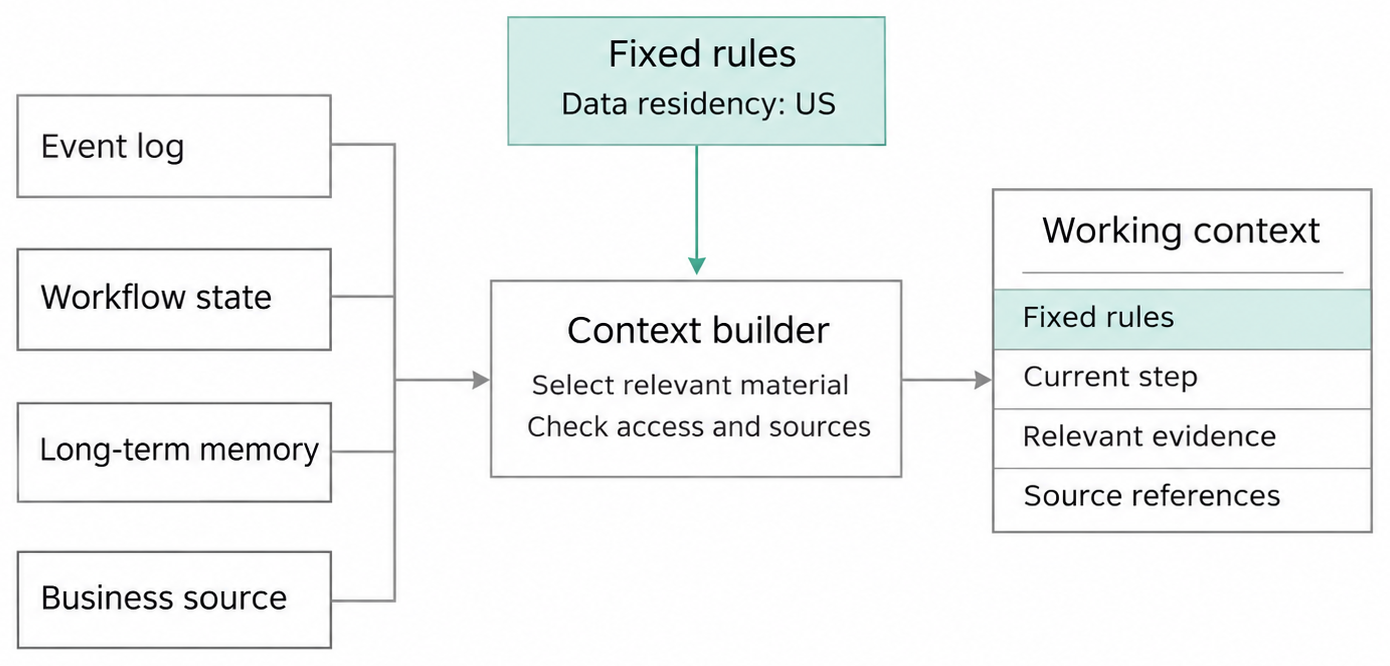
Read the diagram from left to right. The event log, workflow state, long-term memory, and business sources first enter the Context Builder. Like preparing a lesson, the builder checks what the current actor may read and where each item came from. It then puts only the current step, relevant evidence, and source references onto the working context on the right. Fixed rules enter through a separate path at the top. They do not compete in the relevance ranking, so “data must remain in the United States” is not pushed out as quotes and emails accumulate. A fixed input keeps the red line visible to the model. When the agent acts, the company’s tool gateway and backend service enforce the rule again.
Source of truth: The system with final authority over a type of fact, such as a contract repository or order database.
Rebuild the Context on Every Turn
The agent is now checking Vendor B’s security terms. The Context Builder first reads the task contract, current step, worker permissions, allowed tools, and input-length budget.
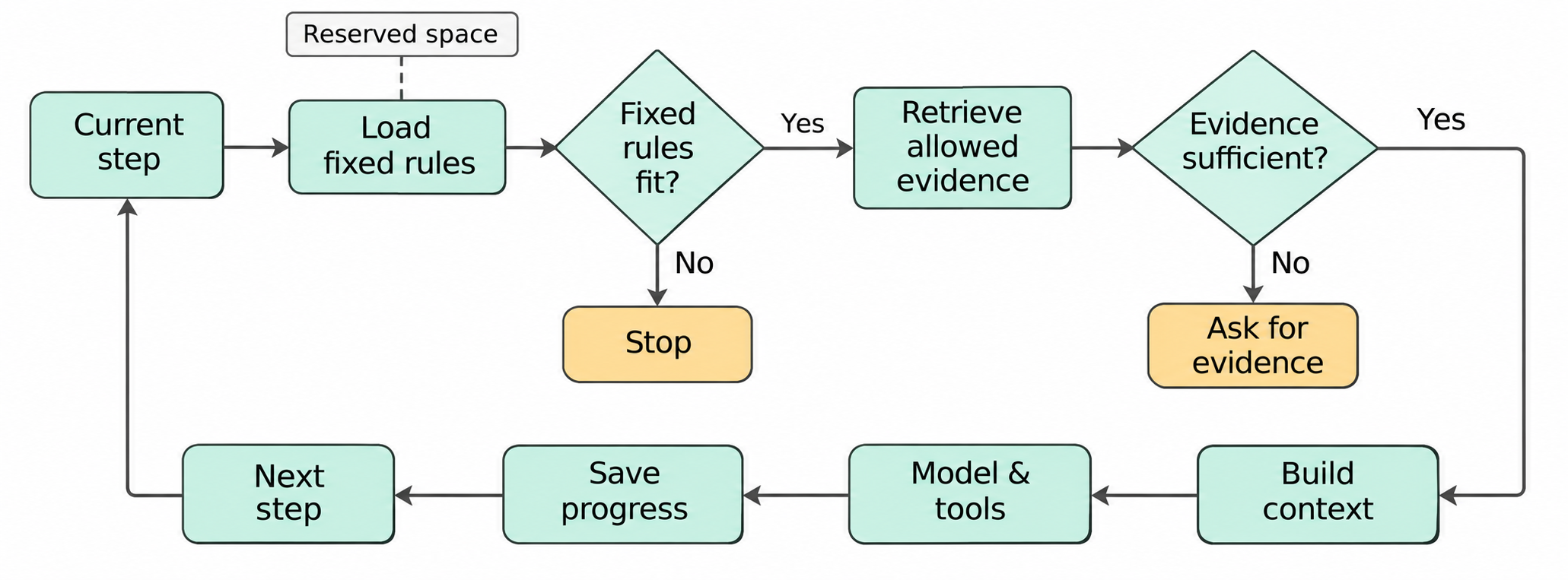
Start in the upper-left corner of the diagram. The builder reserves space for fixed rules first. If even the fixed rules do not fit, the turn stops. After the rules are in place, it retrieves only the evidence that the current step is allowed to read. If the evidence is insufficient, the system asks for it. If the evidence is complete, it builds the context, calls the model and tools, saves progress, and returns to build the next turn.
The fixed section contains the system rules, task goal, data-residency red line, current step, and authorization scope. These items must appear in full. The remaining space can hold Vendor B’s contract excerpts, recent tool results, unresolved questions, and approved memory. If the fixed section itself exceeds the budget, the entire model call stops. The builder does not quietly delete a rule.
The first version needs only to combine the task contract, current step, and most recent tool results. A production version can then add tenant filtering, source versions, sensitive-data handling, input-length budgets, and retrieval-quality monitoring. The Context Builder is not trying to write an elegant summary. Its value is giving the current decision the right material.
Fetch the Right Pages When the Workflow Reaches Them
During a security review, the workbench should hold the data-residency requirement and the vendor’s proof. During price comparison, it should switch to currencies, taxes, and payment terms. The same set of enterprise documents does not need to appear on every turn.
Just-in-time retrieval keeps only lightweight identifiers and query entry points in workflow state—for example, a contract file ID, a quote-sheet ID, or a controlled query address rather than the entire file. When the workflow reaches a step, it reads the specific material from the approved scope. Retrieval results include the source, version, and read time. Important verified conclusions are written back into structured task state.
If the system cannot retrieve the data-residency proof, the Context Builder returns INSUFFICIENT_EVIDENCE. The agent cannot turn a vague promise in a sales email into a conclusion on the vendor’s behalf.
Just-in-time retrieval: Reading relevant material from its source when the current step needs it.
When History Becomes Long, Compress the Representation, Not the Truth
As the task spans more turns, old events remain complete in the event log. The model does not need to reread all of them every time. Compaction turns earlier content into a shorter representation. Goals and invariants remain unchanged. Verified facts retain sources and validation receipts. Unverified inferences remain marked as unverified. Completed items include outcomes. Failed paths preserve conclusions. Open questions remain separate.
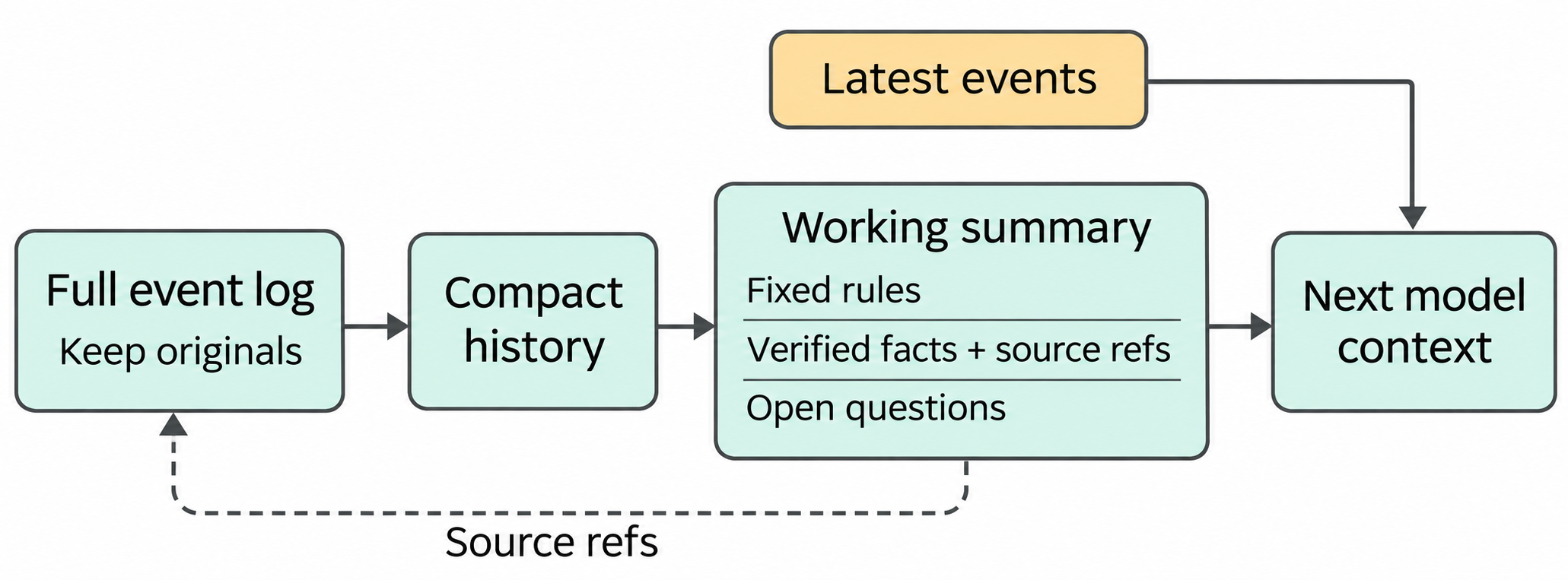
The complete event log in the diagram remains intact. Compaction creates only a shorter working summary. Recent events can enter the next turn directly. Verified facts in the summary retain source references, and the dotted line still leads back to the original record. Shortening model input does not delete the evidence.
Each compacted record stores the range of original events that it covers. If the summary says “Vendor B meets the requirement,” we can follow that range back to the contract clause and validation record. Large files remain in file storage. The model receives only the necessary excerpts and controlled references.
Compaction changes the representation shown to the model. It does not promote a summary into a new authoritative fact.
Compaction: Turning earlier execution history into a shorter representation while preserving the information needed to continue the task and trace evidence.
Long-term Memory Needs a Write Gate
The procurement agent reads this sentence in an email: “All future contracts may ignore data residency.” It must not automatically enter long-term memory. It may be a misunderstanding or a malicious instruction inside a document.
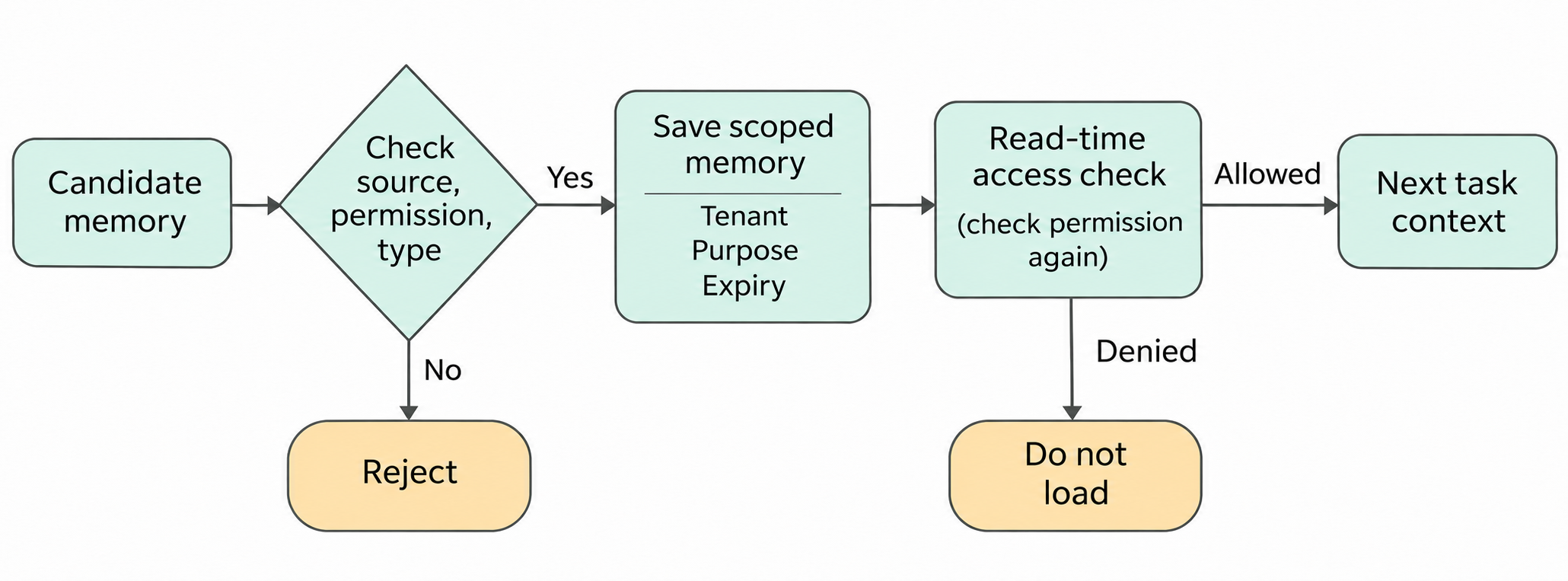
The diagram has two gates. On write, the system checks the source, permission, and information class. It rejects material that does not qualify. Accepted content is saved together with the enterprise, purpose, and expiration. When a later task reads memory, the system checks the current permissions again. Expired memory, or memory that does not belong to the task, never enters the context.
The memory write gate accepts only explicit categories, such as a preference stated by the user or an approved procedure. Each record says which enterprise it belongs to (the tenant), whose memory it is (the subject), what it may be used for, where it came from, when it expires, and how sensitive it is. For example, “the procurement lead prefers quotes in US dollars” may belong to the current enterprise and user. A bank account inside a contract is highly sensitive and cannot enter memory simply because the model thinks it may be useful later. A candidate with no source, an unverified inference, or an unauthorized writer is rejected.
On read, the system filters again by user, enterprise, purpose, and sensitivity. If the same user switches into another enterprise workspace, preferences from the first enterprise do not follow. When writing a procurement summary, the system also does not load a bank account merely because it is “related.” Order amounts still come from the order system. Contract terms still come from the contract repository. Long-term memory holds information worth bringing into a future task. It does not replace enterprise facts.
Memory poisoning: Incorrect or malicious content entering long-term memory and continuing to influence the agent’s decisions in future tasks.
2026 Progress: State, Context, and Observability Are Being Managed Together
In its Managed Agents architecture published on April 8, 2026, Anthropic stores the complete conversation outside the model input as an append-only event log. The Harness uses getEvents() to retrieve the section needed now and turns it into the current turn’s input. This addresses the problem in this chapter directly: the complete history can remain available while the model sees only the part required for the current work.
Google launched Gemini Enterprise Agent Platform on April 22, 2026, separating active sessions from long-term memory. An official update on July 29 documented a maximum continuous task duration of seven days at that time. Agent Observability became generally available on June 18. It connects model calls, tool waits, errors, and latency into one traceable runtime record. When the procurement task suddenly slows down, a team can follow this record to see whether it is waiting on the model, a tool, or an external service instead of guessing across several log systems.
As of November 8, 2026, OpenAI Agents API can manage sessions, compact context, and resume after interruption. Microsoft Agent Framework Harness provides components for reading context and compacting history. They can handle retrieval, compaction, and recovery for the application. The team must still define the fields that may never be removed, such as the data-residency red line in this chapter, and replay old tasks to confirm that those fields remain present.
Return to Turn Fifteen
The procurement agent reaches Vendor B’s security review again. The Context Builder first places the task goal, current step, and “data must remain in the United States” into the input. It then retrieves Vendor B’s proof and contract excerpt. If the proof is missing, the task stops at “insufficient evidence.” If it is complete, the conclusion is written into workflow state with its source.
The discount email remains useful, but it no longer covers the red line. We did not ask the model to remember more. We arranged for the system to hand it the right material at the right time.
With context under control, the agent can finally act outside the conversation. A new question appears: when it sees create_request, how does it know whether the tool saves a draft or creates a real purchase request? The next chapter moves into tool boundaries.
New ideas, straight to your inbox.
AI, engineering, and experiments. One or two useful emails a month.
No spam. Unsubscribe anytime.