![[Training a 500B LLM from Scratch] 13/25: How Do We Keep Data Flowing and Save Training Progress?](/_next/image?url=%2Fblog%2Ftraining-500b-part-13-cover.webp&w=3840&q=75&dpl=dpl_DBM4Nqj1fQkPyUCy2Z8YS4coyCUi)
[Training a 500B LLM from Scratch] 13/25: How Do We Keep Data Flowing and Save Training Progress?
The data center and cables are ready, and our 5,120 B200 GPUs can get to work. Next, we need to keep them training for about 76 days. Two things happen every day: new material comes in, and the model's parameters change.
Imagine we have reached day ten. If the next batch of material has not arrived, the GPUs must wait. If a server suddenly fails, we need a way to continue from day ten. This article covers both jobs: keeping material available and preserving the work already done.
We will follow the path of a training run. First, we will see how the training material moves from disk to GPU. Then we will see how training progress goes back to disk. Once those two paths are clear, we can work out the space, speed, and equipment we need.
A GPU reads one small batch at a time
Let's pick up from Part 9. We have already converted text into token IDs and arranged them into training sequences. Open a file of English training material, for example, and its main contents can be represented as a long list of integers: [418, 732, 25, …]. This shows the format; the actual IDs depend on the tokenizer.
These files live in shared storage. Think of it as a common library for all 640 training servers, holding one complete version of the training material. The training program assigns each server the material it needs according to the data recipe.
During computation, a GPU receives only the current small batch of sequences. The program first fetches upcoming files from the library and puts them on the server's own solid-state drive. It then loads a batch of IDs into server memory and sends it to the GPU. While the GPU processes that batch, the program prepares the next one.
Why keep files near each server? Training shuffles material, mixes sources, and reads some material more than once. Keeping upcoming files nearby saves repeated trips to the library. We initially allocate a 1TB local cache on each server for the material it will need soon. As that space fills, the program replaces its contents according to the upcoming sampling plan.
The complete inventory of 5T tokens therefore stays in shared storage. Each server takes what it needs, and each GPU processes a small batch at a time. The path is: shared library → local server drive → server memory → GPU.
Shared storage: A file storage system that multiple servers can access. Here, it holds the common training material and recent training progress.
Cache: Space used to keep upcoming content closer to where it will be used. Here, it is on each server's own solid-state drive.
Prefetching: Preparing the next batch of material before processing of the current batch finishes.
Why do 5T tokens take up only 20TB?
Two numbers are easy to mix up here. In Part 7, we set a target inventory of about 5T distinct, qualified tokens. Training reads some material more than once, for a cumulative total of 10T tokens.
Think of a library with five million pages that we read for a total of ten million page reads. To reread a page, the sampling program finds that page again. The disk still needs only one copy.
Files store these tokens as IDs. Our plan uses four bytes per ID, so the main token data takes up:
5 trillion IDs × 4 bytes each = 20 trillion bytes = 20TB
Why is that so small? The disk stores token IDs. The vectors associated with those IDs belong to the model, which looks them up during training. We do not store a full vector in the dataset for every occurrence of a token.
With the 20TB accounted for, we also need room for indexes and supporting files. An index tells the program where a document starts and how long it is, so the program can find a passage without scanning the entire file. We allocate 30TB of usable space to the training dataset: 20TB for token IDs, with the rest reserved for indexes, document boundaries, and related files.
We also retain raw web pages and versions from before and after cleaning. Those go into separate archive storage. The training workspace holds the selected version that we are about to feed to the model.
Why use four bytes per ID?
Megatron's dataset implementation selects an integer format based on vocabulary size. Our plan uses four-byte integers, or int32, for a large vocabulary. When we build the final dataset, we will check the selected tokenizer, ID format, and actual file sizes together.
TB: We use decimal units throughout this article. 1TB equals 1,000GB. A figure such as 20TB describes how much space a file takes up.
Index: Information about document locations and lengths that helps a program find the content it needs directly.
How do we save what the model has learned by day ten?
After material moves from disk to GPU, the GPU uses it for computation and the program updates the model's parameters. The model on day ten differs from the model on day one. To preserve those ten days of work, we need to save the current training state.
This saved state is called a checkpoint. It is a save point for a long-running task. After restoring it, the model has its updated parameters, and the program knows which step it reached and where to resume reading the training material.
Start with the most direct part. A 500B model has 500 billion parameters. At two bytes per parameter, its model weights take up:
500 billion × 2 bytes = 1TB
Continuing training requires another set of records. The optimizer, which adjusts the parameters, uses information from past updates to decide what to do next. Current parameters alone cannot preserve that adjustment process. The checkpoint must also include the optimizer's working state.
Our plan uses a common mixed-precision Adam setup. At the end of a complete training step, we save three main components:
| What we save | Why we save it | Size |
|---|---|---|
| Current model weights | Restore the model's current parameters, at 2 bytes each | 1TB |
| Higher-precision master weights | Used to update parameters, at 4 bytes each | 2TB |
| Adam's two sets of historical state | Preserve information used to determine subsequent updates, at 8 bytes per parameter in total | 4TB |
| Total | 14 bytes per parameter | 7TB |
That is where “7TB per checkpoint” comes from. It preserves the training state of the entire 500B model, which is much larger than the small batch of material we just read.
The whole cluster shares the 7TB. Each training process saves the part it owns; together, these parts form one complete checkpoint. We also save the step count, learning-rate schedule, random state, and data-reading position. NVIDIA's checkpoint documentation includes this information in the process for a complete training restart.
Earlier, we used 8TB when calculating training memory. Why is this figure 7TB? The purpose and timing differ. During training, memory also holds gradients used to update parameters in the current step. We save this checkpoint after that update. Those gradients have finished their job, and the next step will calculate new ones. We therefore budget 7TB for the main saved state.
Checkpoint: A saved copy of the model and training state at a particular point. Restoring it allows training to continue from that point.
Optimizer: An algorithm that adjusts model parameters using calculated gradients. Its historical state affects subsequent adjustments.
BF16 and FP32: Two numerical precision formats. Here, they use two and four bytes per number, respectively.
How many checkpoints do we keep, and where?
We start with a straightforward policy: save once an hour and keep the three most recent checkpoints in fast shared storage. If a save completes at 10:00 and a server fails at 10:40, we can resume from 10:00 and repeat the following 40 minutes of computation.
More frequent saves generally reduce the work lost after a failure, but they also increase disk writes. We will start with an hourly interval, then adjust it after trial runs measure save time, recovery time, and failures.
While writing the next checkpoint, we must keep the three existing ones. We delete the oldest only after the new checkpoint is complete and passes its checks. The fast workspace must therefore hold four at once:
3 completed checkpoints + 1 being written = 4 × 7TB = 28TB
Allowing for supporting files and space needed during writing, we allocate 35TB to recent checkpoints.
There is another possible failure: the shared storage itself. All three recent checkpoints live there, so we need another place from which to recover. Each day, we therefore select one complete checkpoint and copy it to an independent archive system.
The main training run is planned for 76 days. At one checkpoint per day, with 7.5TB budgeted for each checkpoint and its supporting files:
76 checkpoints × 7.5TB = 570TB
We round this up to 600TB, or 0.6PB, dedicated to daily checkpoints across the full training run. Archive space for raw material and cleaned dataset versions is allocated separately.
The two sets of checkpoints now have distinct purposes. The three most recent copies stay in fast shared storage for a quick restart. Daily copies stay in an independent archive to preserve longer-term progress and provide a recovery path if the shared system fails.
Archive: Storage for files that we need to retain over time but read less frequently. The checkpoint archive in this plan is on an independent system.
PB: 1PB equals 1,000TB. Here, 0.6PB means 600TB.
We have enough space. How long will we wait?
We now know how much we need to store. Next comes speed: how long do we wait at startup, and how long do we wait for a save? These two situations determine our read and write requirements.
Start with ordinary training. At four bytes per token ID, the cumulative 10T tokens amount to about 40TB of useful ID input over 76 days. Averaged over time, that is only about 6.1MB per second. The model performs substantial computation on each batch, so the average volume of input files can be modest.
At the first startup, however, the caches on all 640 training servers are empty. We want each server to receive its upcoming material quickly. We therefore define a coordinated loading test: have the cluster read one 20TB set of token IDs using the actual data-distribution pattern, with a ten-minute completion target.
20,000GB ÷ 600 seconds ≈ 33.3GB/s
We choose 40GB/s as the shared-storage read acceptance target. This measures moving a large amount of material at startup. The earlier 6.1MB/s measures the average amount of token data delivered to the model over 76 days. A short burst of coordinated loading and a long-term average answer different questions.
Actual sampling also reads indexes and may send the same file to more than one server. The acceptance test must follow the real distribution pattern, count repeated transfers, and record when each server is ready.
Next, consider writes. We need to save about 7TB of main state every hour, and we allow ten minutes for a complete checkpoint. Those ten minutes include preparing the state, transferring it, checking files, and confirming completion. We initially allocate five minutes of that window to data transfer:
7,000GB ÷ 300 seconds ≈ 23.3GB/s
Rounding up gives a sustained write target of 25GB/s. During testing, training should continue reading material while the checkpoint is written. We need to see whether saving causes GPUs to wait for data. Where saving can run in the background, we overlap it with training, while still recording how long training actually pauses.
Our purchasing requirements therefore become two concrete tasks: finish the coordinated load on time, and make a roughly 7TB checkpoint complete and usable within ten minutes. The 40GB/s read and 25GB/s write figures are acceptance targets set for these tasks. We will measure them with our real files and training program.
GB/s: Gigabytes transferred per second, a measure of read or write speed. TB tells us how much fits; GB/s tells us how fast it moves.
Asynchronous saving: First capturing a consistent training state, then continuing file writes in the background so that part of the save can overlap with training.
Put the three kinds of storage back into the data center
We can now choose equipment. The shared workspace must first hold 30TB of training material and 35TB of recent checkpoints, or 65TB in total. Data conversion and version changes also need working space. We choose the 120TB usable-capacity configuration of the DDN AI400X3M as a concrete purchasing example.
DDN's official 2026 introduction lists configurations with 120TB, 250TB, and 500TB of usable capacity. We choose 120TB because it accommodates this space plan:
| Use | Allocation | Reason |
|---|---|---|
| Training material and supporting files | 30TB | 20TB of token IDs, plus indexes and related files |
| Recent training checkpoints | 35TB | Keep three while writing a fourth |
| Data conversion and version changes | 35TB | Hold a temporary copy of the 30TB dataset and processing files during a change |
| Remaining headroom | 20TB | Allocate according to actual file overhead and experiment needs |
| Total | 120TB | Verify usable capacity during acceptance |
The 1TB cache beside each training server and the independent 0.6PB daily-checkpoint archive each have their own place. The 640 server caches add up to 640TB, but that space is spread across different machines and includes duplicate content. The shared system still has its own 120TB allocation.
Now look at the diagram. Blue lines carry training material from shared storage to each server and then to its GPUs. Orange lines carry training state back to shared storage and copy a checkpoint to the independent archive each day. The three storage locations serve three purposes: a common dataset and recent progress, the material each machine needs next, and progress retained over the longer term.
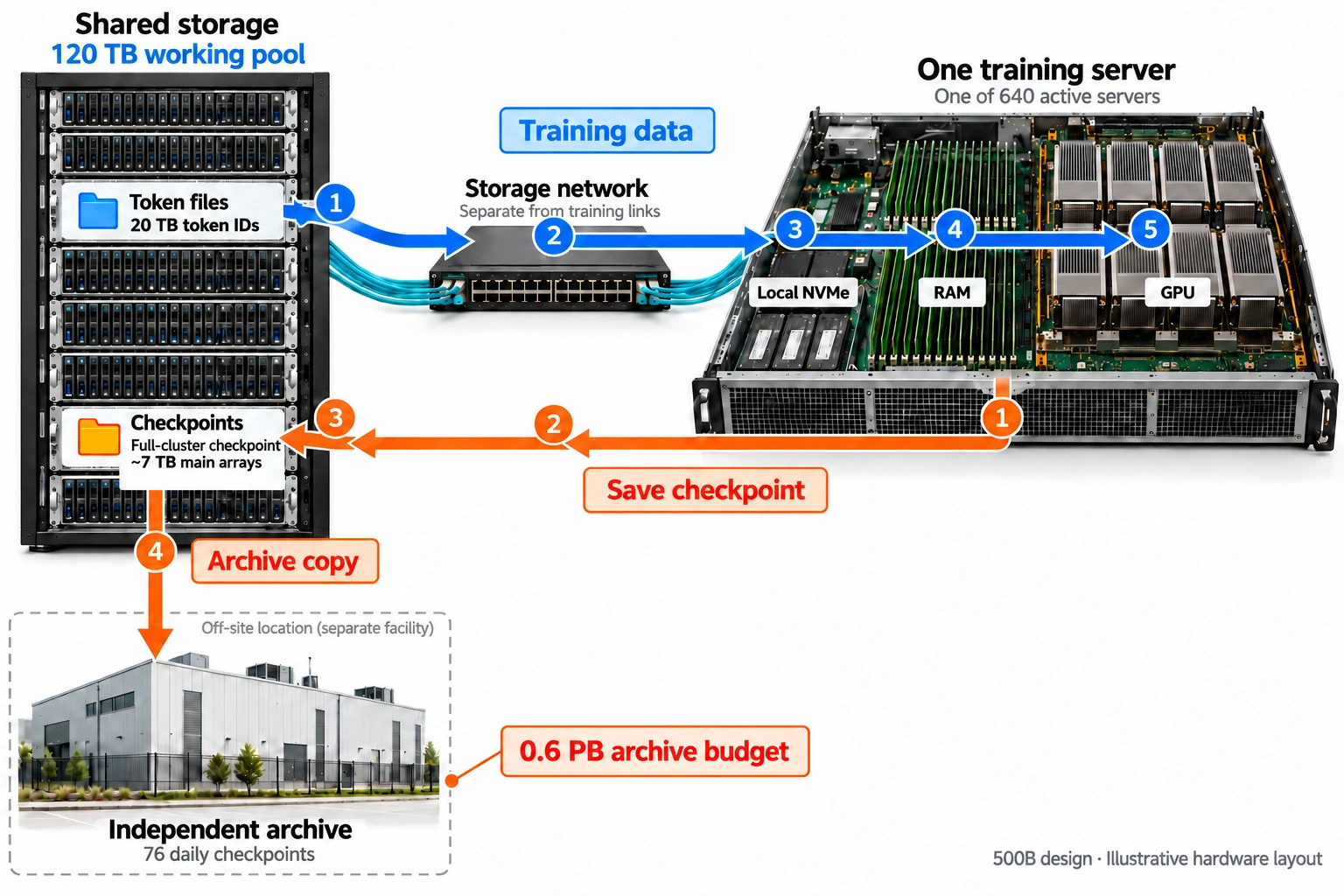
Follow blue lines for training data and orange lines for saved progress. The equipment layout illustrates the plan. Click to view the full-resolution image.
The supplier must deliver a complete system accessible to all 640 training servers and test this 120TB configuration against concurrent read and write targets of 40GB/s and 25GB/s. Expand the checklist below for software, connections, and endurance requirements.
Include these items in the purchasing and integration checklist
The order includes the AI400X3M appliance, accompanying ES400NVX2 management nodes, EXAScaler filesystem software, and support. The filesystem lets servers read, save, and manage shared files through directories. Acceptance requires 120TB of usable space after system and data-protection overhead.
Storage uses a separate network. The training-switch ports in Part 12 are already allocated to GPU communication. Here, we require an independent 200GbE Ethernet network, with additional NICs and switches specified by the supplier. We also check the servers' remaining slots and PCIe connections. A nominal 200Gb/s link is about 25GB/s in bytes, and actual file throughput will be lower. The storage side needs multiple connections to serve concurrent cluster traffic, followed by verification of the overall read and write targets.
The 1TB cache on each server initially comes from a working-space quota on the local solid-state storage included in the server configuration. The integration checklist must confirm actual usable space, operating-system usage, and drive counts. After a server replacement, its cache can be refilled from shared storage.
We must also check SSD endurance. Saving 7TB of main state every hour produces about 168TB of logical writes per day. Keeping only a few recent checkpoints limits occupied capacity, but all completed writes still count toward drive wear. The supplier must check endurance and replacement provisions against the actual checkpoint size, save frequency, and service period.
DDN's platform peak figures can help us shortlist equipment. Final acceptance uses this specific 120TB configuration, reading training material and writing real checkpoints concurrently while recording sustained speed, training wait time, and complete save time.
Usable capacity: Space that can actually be allocated to files after system and data-protection overhead.
Finally, stop a run and resume it
Once the equipment is ready, we still need a complete recovery drill. Run a short training segment, save a checkpoint, deliberately stop, replace one position with a spare server, and continue from the checkpoint.
First, confirm that every shard has been written and all file checks pass, then mark the checkpoint as recoverable. During recovery, check the parameters, optimizer state, step count, and data-reading position. Run a little further and compare the result with an uninterrupted control run, using the numerical tolerances allowed by the training implementation.
Perform this recovery once from shared storage and once from the independent archive. That is how we establish that a saved checkpoint can actually be used later, beyond the presence of files in a directory.
| What we need to verify | Target in this plan |
|---|---|
| There is room for training material | 120TB usable shared storage, divided as shown above |
| Material loads quickly at startup | Load 20TB of token IDs using the real distribution pattern, targeting ten minutes and counting repeated transfers |
| Training can read while progress is saved | Test concurrent reads at 40GB/s and writes at 25GB/s, and record GPU wait time |
| A checkpoint is ready on time | About 7TB of main state plus supporting files, complete and recoverable within ten minutes |
| Training can continue after a failure | Recover once from shared storage and once from the independent archive, checking training state and subsequent results |
Our starting configuration is now clear: a 120TB shared workspace, a 1TB cache per training server, and a separate 0.6PB allocation for daily checkpoints over 76 days. The GPUs keep reading material in small batches, and the system saves progress each hour. We know where the next batch comes from, and we know how to resume training after the machines stop.
New ideas, straight to your inbox.
AI, engineering, and experiments. One or two useful emails a month.
No spam. Unsubscribe anytime.