![[Training a 200B LLM from Scratch] 12/25: How Do We Install the NICs and Cables for Two Thousand GPUs?](/_next/image?url=%2Fblog%2Ftraining-200b-part-12-cover.webp&w=3840&q=75&dpl=dpl_DQUY32PJxzNbUqNkKHM5McfBHaPz)
[Training a 200B LLM from Scratch] 12/25: How Do We Install the NICs and Cables for Two Thousand GPUs?
The previous article placed the machines in a data center plan. This time, we walk behind the cabinets to connect independent servers into a cluster that can train together. The installation team needs a wiring schedule they can follow on the actual equipment: which card goes in which machine, which transceiver goes in which port, and where the other end of each fiber cable belongs.
We will connect one port on one server first, then repeat the same rule across a cabinet, a server group, and the entire hall. We retain Part 3's equipment choices: eight-GPU B200 servers, ConnectX-7 NICs, 400G InfiniBand switches, and matching optical transceivers and fiber cables. The focus here is where these parts sit and how they fit together.
Start with the delivery list: what is already assembled?
B200 is the GPU model. We are buying Exxact servers containing eight B200 GPUs each, along with processors, memory, power supplies, fans, and expansion slots. The installation team receives a chassis ready to mount in a rack.
The eight GPUs inside need fast connections to exchange data. The HGX B200 platform uses NVLink and NVSwitch for this internal interconnect. The server supplier should deliver those connections already assembled and validated. The data center team's work starts with accepting the complete server, then connecting its external network.
NVLink: A high-speed interconnect between GPUs. In this article, it connects GPUs inside one server.
NVSwitch: A switching component that connects multiple GPUs inside a server.
The external training network requires a separate check of the order. Part 3 allocated eight single-port ConnectX-7 NICs per server, model MCX75310AAS-NEAT. We include them in the server order with their installation positions, transceivers, and acceptance requirements, for the supplier to integrate. The team can then check all eight training ports against the list when the machines arrive.
NIC: A network interface card installed in a server to connect it to an external network.
If the NICs are installed on site, qualified personnel follow the manufacturer's procedure, disconnect all redundant power feeds, and apply electrostatic-discharge precautions before installation. The purchased server's manual supplies the disassembly and installation steps. Here, we will establish where the installed parts sit and how they connect.
Walk behind the chassis and find the training NIC ports
At the back of a server, the most visible parts are often power supplies, fans, and rows of connectors. Identifying them is the first step toward knowing where each cable goes.
Exxact's current public material does not provide a sufficiently clear view of the entire rear panel. We will therefore use the official manual for the ASRock 8U8X-TURIN2 SYN B200, another 8U B200 system, to recognize the rear-panel structure. Our procurement plan still uses Exxact; actual slot positions will be mapped to the final delivery drawing.
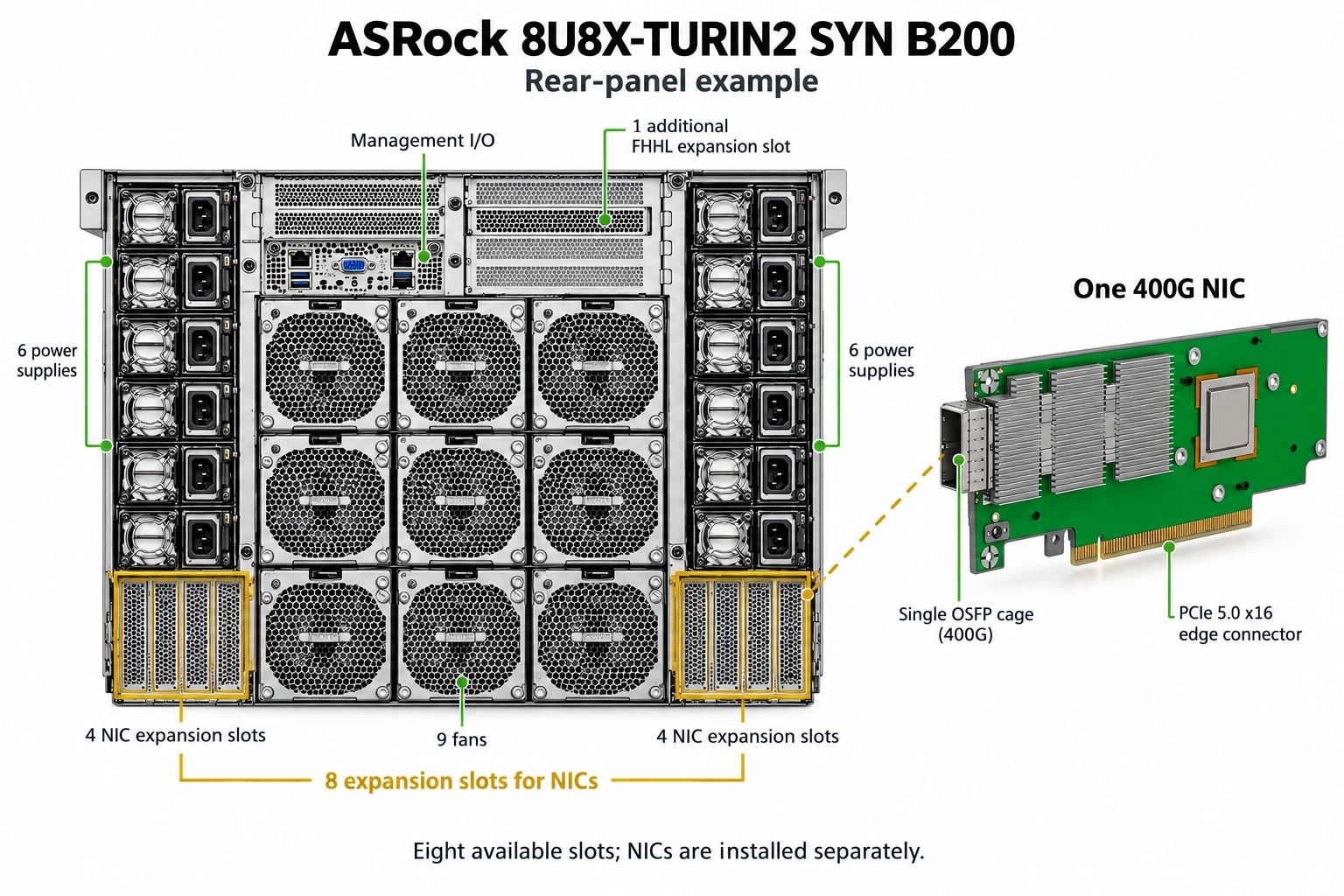
Structural reference based on the ASRock manual; the project's procurement model remains Exxact. Click to view the original image.
On this ASRock example, power supplies occupy the left and right sides, fans sit in the middle, management interfaces are above, and four expansion-card positions sit at the bottom of each side. A NIC's edge connector fits into the internal PCIe connection, while its metal bracket is secured at the chassis opening. Once installed, the network connector is accessible from the rear. Empty expansion slots provide mounting positions; the delivery list must also state what is actually installed in them.
PCIe expansion slot: A position inside a server for an expansion card such as a NIC. Once the card is installed, its external connector usually becomes accessible through a chassis bracket.
Management and training ports serve separate purposes. Management interfaces let operations staff inspect machine status and control equipment remotely. Training NICs carry the large exchanges of data between GPUs. The installation schedule records the network connected to each, so a familiar-looking management connector is not mistaken for a training port.
Our plan labels each machine's eight training NICs NIC1 through NIC8. We map those labels to physical slots, record each card's identifier, and include the mapping in the handover records. These numbers are project labels, rather than a claim that every manufacturer arranges cards in that order from the left side of the chassis.
One NIC, one transceiver, one fiber cable: make the first connection
The network cables connecting our training machines are matched multimode fiber assemblies. Stand behind G1-S01, the first machine in the first group, and find the port labeled NIC1. We selected a single-port 400G NIC. Its exposed OSFP cage receives an MMA4Z00-NS400 transceiver, followed by the fiber cable. The optical connector at the front of the transceiver is MPO-12/APC. Each end of the matching fiber assembly has a plug that fits this connector on the transceiver, not the internal PCIe slot.
Optical transceiver: A component that converts electrical signals into optical signals and receives optical signals. It plugs into the equipment, and the fiber cable plugs into it.
MPO: A connector that combines multiple optical fibers in one plug. This plan uses the specified MPO-12/APC type.
400G: Here, a nominal transmission rate of 400 billion bits per second for each network link.
The other end of the fiber goes to a switch. Our NVIDIA Quantum-2 MQM9700-NS2F has 32 OSFP cages on its panel. Each receives a dual-port MMA4Z00-NS transceiver that provides two independent 400G connections. Its 32 cages therefore provide 64 logical ports.
OSFP: The form factor used for the transceivers and cages in this article. A transceiver must also match the network type, speed, and distance requirements.
Logical port: An independently used network connection endpoint. Here, a dual-port transceiver in one switch cage provides two such endpoints.
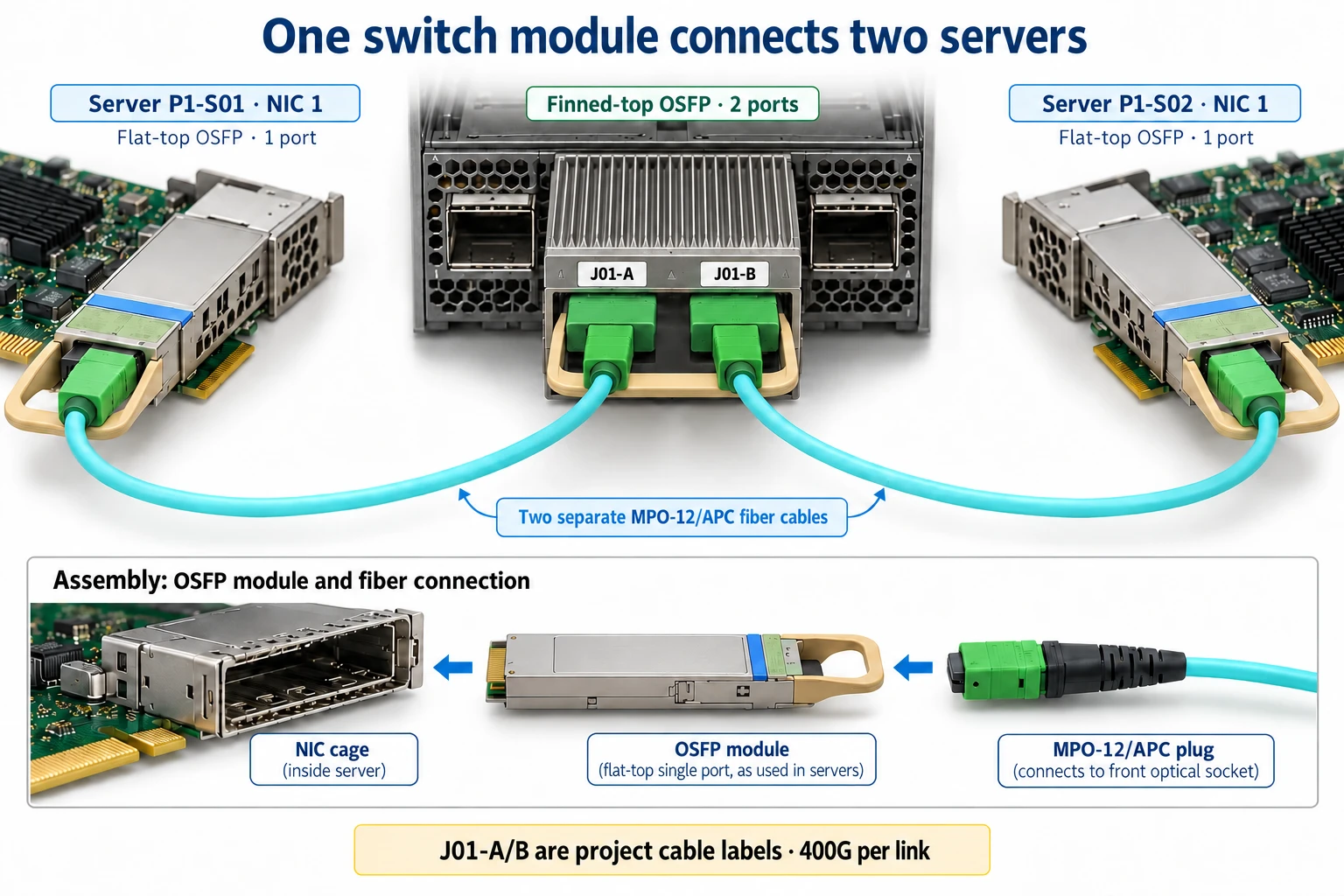
Matching components assembled together; each fiber cable independently connects one 400G port. Click to view the original image.
The first connection now consists of parts we can physically install: put a single-port transceiver in NIC1 on G1-S01 and attach a matching fiber cable. Plug the other end into one connector on a dual-port transceiver in switch L1-1. Its second connector can serve another server, with an independent 400G link. The server uses a flat-top single-port transceiver, while the switch uses a finned-top dual-port transceiver, each matched to its equipment.
To record exact positions, we label the switch panel's cages 1 through 32 as J01 through J32, then label each dual-port transceiver's two connectors A and B. These are project cable labels. The integrator maps them to the manufacturer's port numbers and the names used by management software. Physical labels and software queries can then identify the same location.
When installing a fiber cable, first check the transceiver and cable models at both ends. Inspect and clean the end faces using the manufacturer's procedure, then insert the connectors in the correct orientation and confirm they are locked. Cable assemblies must match the specified connector type and polarity, rather than merely appear to fit. Route the remaining cable through cable managers and trays, leave service slack in designated places, and follow the cable's bend-radius specification.
Repeat the first connection across a cabinet and a group
The previous article put two servers in each cabinet. Each cabinet therefore has 16 training ports, eight on each machine. All connect to switches, so each server needs its own identifier. A label such as “this cabinet's first cable” would not be enough.
We divide 256 training servers into eight groups of 32. Each group uses eight lower-layer switches, called leaves. All NIC1 ports in the first group connect to L1-1, all NIC2 ports connect to L1-2, and so on through NIC8 and L1-8.
Leaf: A lower-layer switch that connects directly to servers.
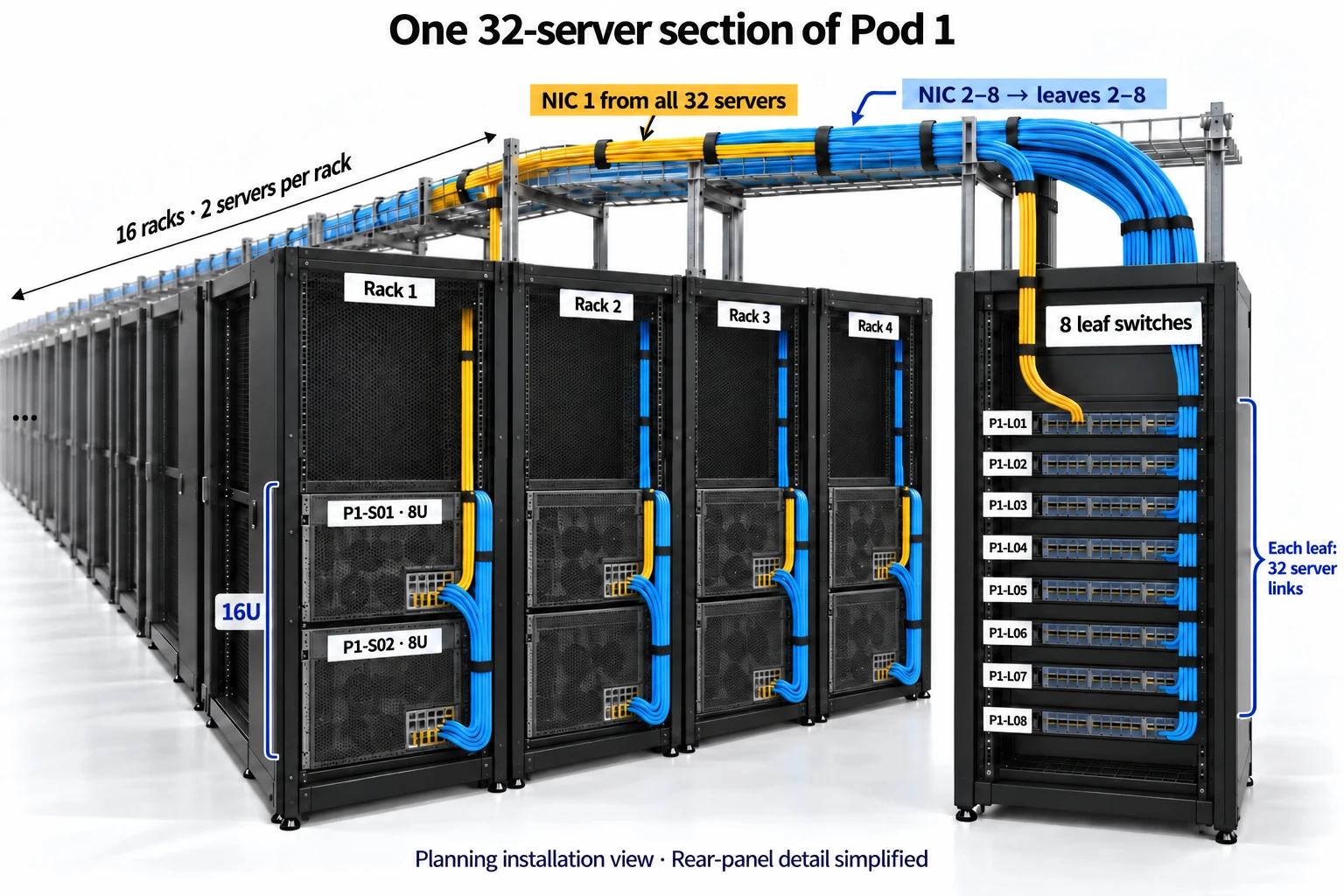
Wiring example for 32 servers, with cabinets connected through overhead trays to eight leaves; rear-panel details are simplified. Click to view the original image.
Each leaf receives 32 server fiber cables. Each dual-port transceiver accepts two, so the first 16 cages, J01 through J16, accommodate all 32 servers. The first few cable records look like this:
| Cable ID | Server end | Switch end |
|---|---|---|
| G1-S01-N1 | NIC1 single-port transceiver on G1-S01 | J01-A on L1-1 |
| G1-S02-N1 | NIC1 single-port transceiver on G1-S02 | J01-B on L1-1 |
| G1-S03-N1 | NIC1 single-port transceiver on G1-S03 | J02-A on L1-1 |
| G1-S32-N1 | NIC1 single-port transceiver on G1-S32 | J16-B on L1-1 |
| G1-S01-N2 | NIC2 single-port transceiver on G1-S01 | J01-A on L1-2 |
Labels remain at both ends of the cable. Pick up G1-S03-N1, for example, and the record tells you that it starts at NIC1 on server 3 and ends at connector A of the second transceiver in L1-1. Installers can follow the table, and acceptance staff can trace each cable back against it.
Applying the same rule to all eight groups gives 64 leaves and 2,048 server-side fiber cables. The eight spare servers retain their corresponding eight NICs and use the existing position's cables when replacing a failed machine. NIC procurement therefore totals 264 × 8 = 2,112 cards, while normal training connects 256 × 8 = 2,048 ports.
Add a layer between switches to connect all eight groups
Each leaf has used its first 16 dual-port transceivers, leaving another 16, or 32 separate 400G connectors. We connect these to 32 upper-layer switches, P01 through P32, with one cable to each. These upper-layer switches are called spines.
Spine: An upper-layer switch that connects the leaves.
On L1-1, J17-A therefore connects to P01, J17-B to P02, and so on until J32-B connects to P32. P07 corresponds to J20-A. Where does the other end of that cable go on P07?
Assign a fixed order to all leaves: L1-1 through L1-8, followed by L2-1 through L2-8, continuing through L8-8. Every spine connects to the 64 leaves in this order. The first two use J01-A and J01-B, the next two use J02-A and J02-B, and the last two use J32-A and J32-B. That reserves J01-A on P07 for L1-1.
| Cable ID | Leaf end | Spine end |
|---|---|---|
| L1-1-P01 | J17-A on L1-1 | J01-A on P01 |
| L1-1-P07 | J20-A on L1-1 | J01-A on P07 |
| L1-2-P07 | J20-A on L1-2 | J01-B on P07 |
| L5-1-P07 | J20-A on L5-1 | J17-A on P07 |
| L8-8-P32 | J32-B on L8-8 | J32-B on P32 |
This table uses the project labels we just defined. For the final handover, add the manufacturer's actual port name to each entry and produce the complete list of 4,096 links. Every leaf connects to all 32 spines, so the eight server groups belong to one interconnected network.
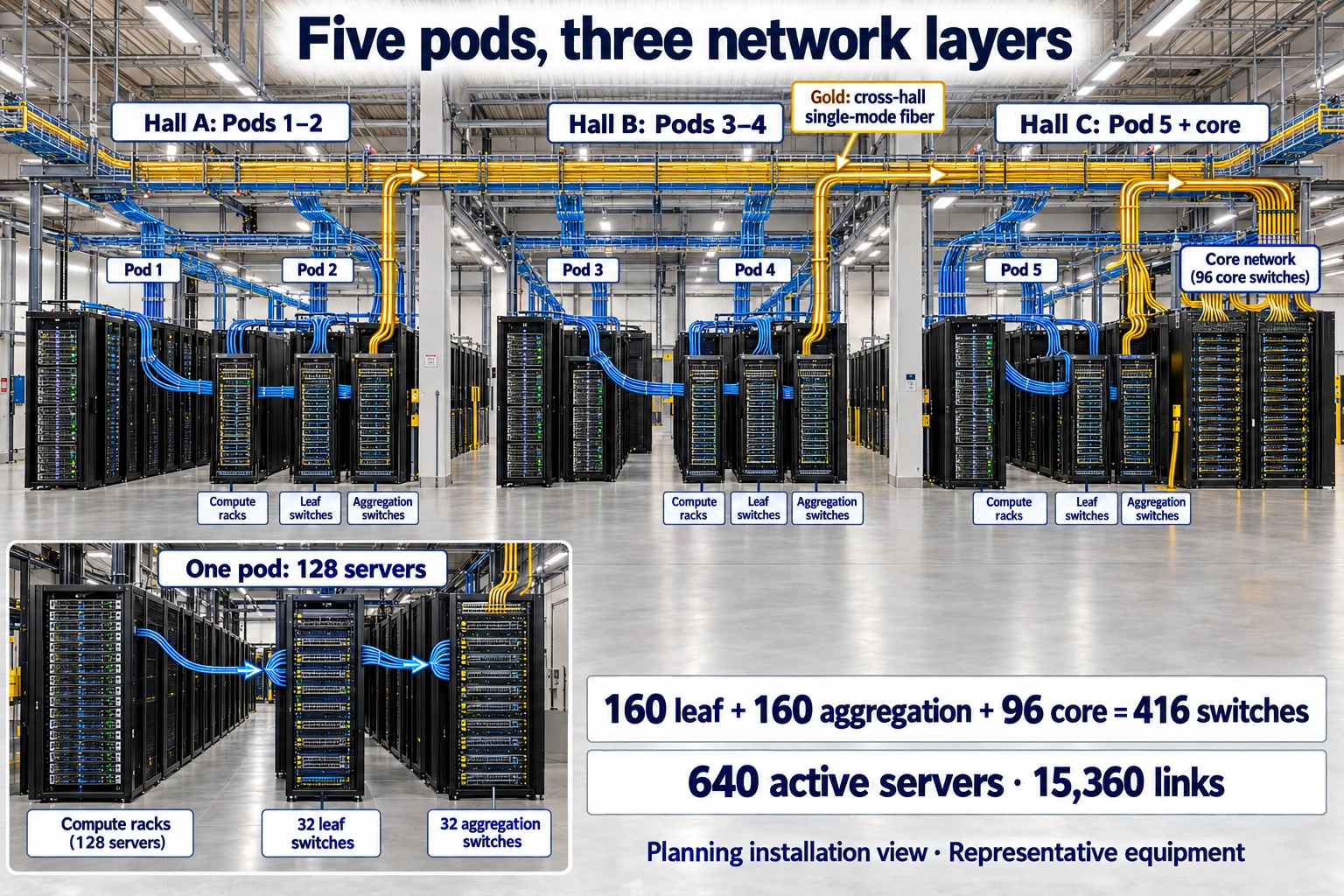
Representative cabinets and cable trays; read the labels for full quantities. Every leaf connects to all 32 spines. Click to view the original image.
We can check the complete parts count by following the installation steps. There are 64 leaves plus 32 spines, or 96 switches. Each takes 32 dual-port transceivers, for 3,072 in total. The server side uses 2,048 single-port transceivers. There are 2,048 fibers from servers to leaves and another 2,048 from leaves to spines, totaling 4,096 cable assemblies. Both ends of every cable have a position in the wiring schedule.
Route the cables, then hand over a verified installation
Fiber cables travel through cabinet cable managers into the hall's cable trays, then down to the destination cabinet. Part 3 used 30-meter cables for budgeting. Before installation, determine each length from its actual route. Beyond the straight-line distance between cabinets, include the rise to the tray, turns along aisles, the drop to the equipment, and service slack.
These transceivers support up to 50 meters with OM4 multimode fiber and 30 meters with OM3. Select the exact combination from the official compatibility information. Longer routes require a matching transceiver and fiber solution. Record each cable's model and length in the wiring schedule so similar-looking assemblies with different specifications are not mixed.
Switch orientation must match the hot and cold aisles in the previous article. The MQM9700-NS2F draws air in at the power-supply end and exhausts it at the optical-port end. Its power-supply side therefore faces the cold side, and its optical ports face the hot side. Cable management and service access are arranged around that orientation, coordinating wiring with cooling.
For staged installation, Zone A's 128 training servers connect to 32 leaves first, while all 32 spines are installed at once. Each spine initially uses half its connectors for the first group of leaves, reserving the other half for Zone B. The second delivery adds the remaining 32 leaves and completes the original schedule. Management and storage networks are wired separately, using none of these already allocated training ports.
At handover, inspect the physical installation first, then check it in software. Physical checks compare machine IDs, NIC positions, transceiver models, both endpoint ports, and cable labels against the schedule. Software checks confirm that all eight NICs are detected, expected links are established, speeds are correct, and there are no abnormal error counts. NVIDIA's link-validation documentation and topology comparison can help match the installed wiring to the design list.
Finally, expand from communication between two machines to training trials across a group and the whole hall, verifying that effective bandwidth and failure recovery meet agreed standards. The installation deliverables are now complete: a mapping of physical slots to NICs, a transceiver and fiber inventory, a wiring schedule identifying both endpoints, and records of physical inspections and operating tests.
What do these handover documents look like?
Use the planned connection from NIC1 on G1-S01 to J01-A on L1-1 as one complete handover example. The entries below contain project plans and demonstration asset labels. Actual serial numbers, slot mappings, and test results are recorded when the equipment arrives. All four documents use the same identifiers, so we can follow a machine through to its acceptance record.
The first table establishes exactly which card NIC1 identifies. Project labels can be assigned in advance; the manufacturer's physical slot and serial number are collected from the delivered machine.
| Field | Example entry |
|---|---|
| Server / example asset label | G1-S01 / EXAMPLE-SRV-001 |
| Project NIC label / example asset label | NIC1 / EXAMPLE-NIC-001 |
| Specified model | MCX75310AAS-NEAT |
| Physical slot and manufacturer serial number | Integrator to map the rear-panel slot; scan and record the serial number on arrival |
| Cable ID and destination | G1-S01-N1 → L1-1 J01-A |
The second table supports parts preparation. It lists transceivers and fibers for the full plan, then shows what this example connection uses. J01 on L1-1, for example, is one dual-port transceiver: connector A serves S01 and connector B serves S02. Both connectors belong to the same transceiver.
| Component / model | Full-plan quantity | Use on this connection |
|---|---|---|
| NIC MCX75310AAS-NEAT | 2,112 cards, including spare servers | One card, NIC1 on G1-S01 |
| Single-port transceiver MMA4Z00-NS400 | 2,048 units | One unit at NIC1 |
| Dual-port transceiver MMA4Z00-NS | 3,072 units | Connector A of the unit at J01 on L1-1 |
| Fiber assembly MFP7E10-N030 | 4,096 assemblies, budgeted at 30 meters | One assembly, G1-S01-N1; confirm length and model from the actual route |
The third table tells installers where both ends belong. Keep the project connector labels, then add the manufacturer's and software's port names at handover. These two rows show a server cable and an uplink. The complete list expands the same format to all 4,096 links.
| Cable ID | Planned endpoint A | Planned endpoint B | Manufacturer / software port names |
|---|---|---|---|
| G1-S01-N1 | G1-S01 NIC1 | L1-1 J01-A | Map both ends on site |
| L1-1-P07 | L1-1 J20-A | P07 J01-A | Map both ends on site |
The fourth table records installation and verification separately. Write the planned criteria first. Site staff then perform each check and enter actual values, logs, and decisions. The 400Gb/s entry here is a link rate to verify, rather than measured training throughput.
| Check and method | Planned pass criterion | Actual record and status |
|---|---|---|
| NIC1: check model, slot, and system detection | Model matches the order; NIC1 uniquely identifies the actual card | Slot, serial number, and system identifier to be recorded; not yet executed |
| G1-S01-N1: check endpoint labels and transceivers | Endpoints match G1-S01 NIC1 → L1-1 J01-A | Endpoint photos and transceiver identifiers to be recorded; not yet executed |
| Same link: read status and error counters | Expected 400Gb/s link established; error metrics meet agreed criteria | Actual rate, error counters, and logs to be recorded; not yet executed |
| Communication workload test | Meets throughput and stability targets from the contract and a matching configuration baseline | Peer, duration, throughput, and decision to be recorded; not yet executed |
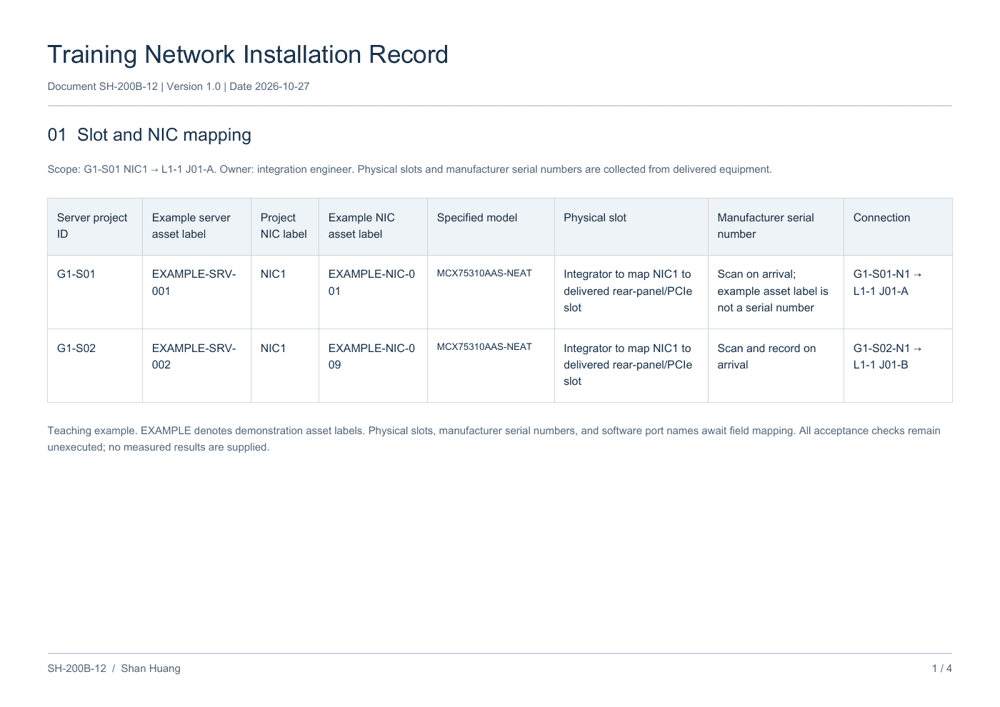
Training Network Installation Record
4-page PDF · Slots, components, cabling, and acceptance
Find the card in the first document, prepare parts from the second, wire according to the third, and record verification in the fourth. The handover records then connect directly to the installed equipment.
The next engineer standing behind a cabinet can then follow a NIC label to its transceiver, fiber cable, and switch connector, understand why that cable is there, and reconnect it correctly when equipment is replaced.
New ideas, straight to your inbox.
AI, engineering, and experiments. One or two useful emails a month.
No spam. Unsubscribe anytime.