![[Facebook & Instagram Ads in 8 Steps] Lesson 3/8: Measuring What Matters – Setting Goals and Key Metrics](/_next/image?url=%2Fblog%2Ffacebook-instagram-ads-lesson-3-measuring-what-matters.jpg&w=3840&q=75&dpl=dpl_5YhAh44zRK9bz9ipZjeTE8pPBLar)
[Facebook & Instagram Ads in 8 Steps] Lesson 3/8: Measuring What Matters – Setting Goals and Key Metrics
Imagine you walk into a restaurant. The server comes to your table and asks, “What can I get for you today?”
You would never reply, “Oh, just bring me whatever,” right? You need to tell them if you want an appetizer, a main course, or a dessert.
In the world of Facebook ads, you are the customer, and Facebook’s powerful AI is your highly skilled server. The clearer your instructions, the more precise the “dish” it will bring you (in this case, the customers it finds for you).
These “instructions” are called your Campaign Objective.
Part 1: Your Destination – Understanding the Most Important Ad Objective
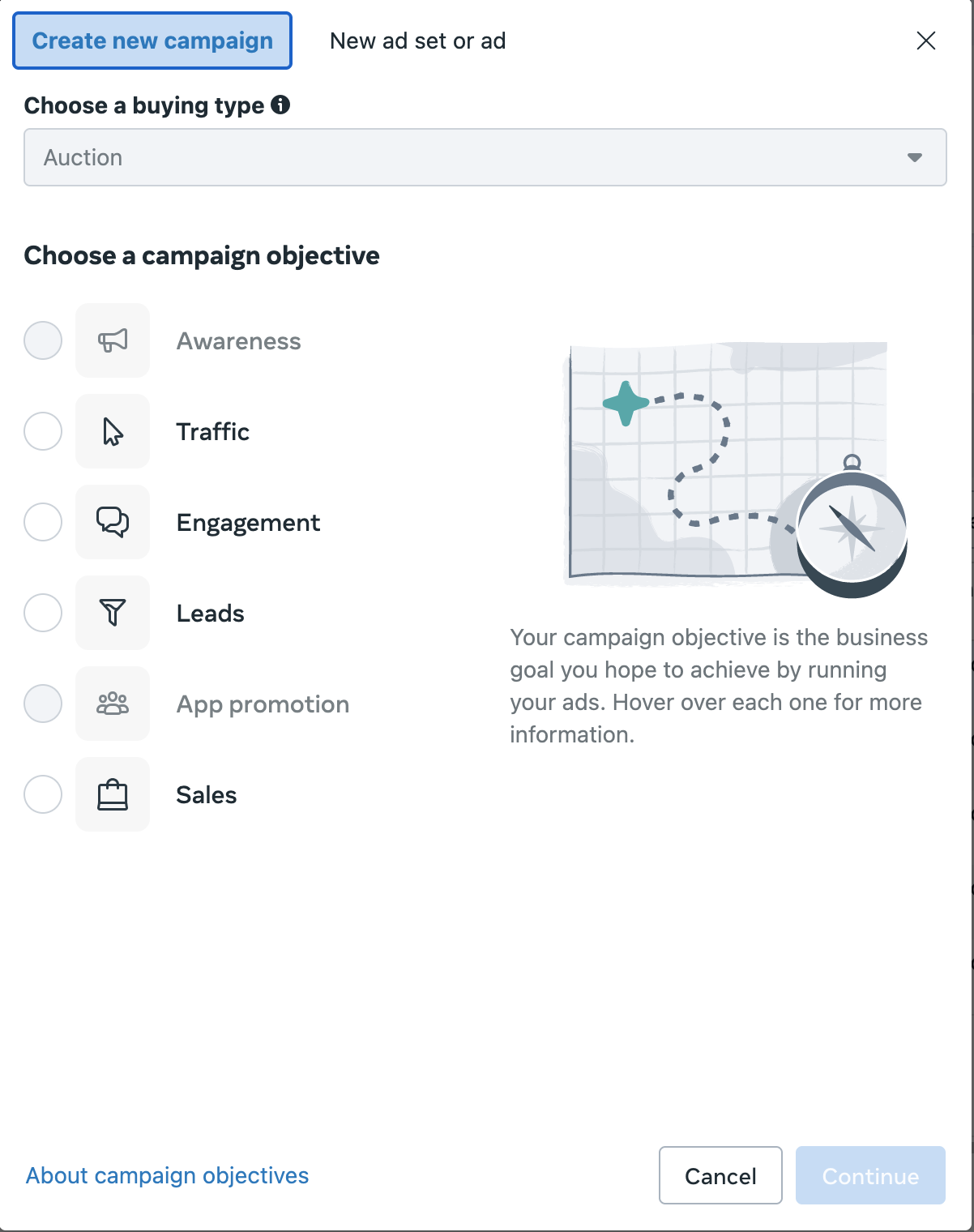
When you create a new ad campaign, the very first thing Facebook asks you to do is choose an objective. You will see a list of options, like “Awareness,” “Traffic,” “Engagement,” “Leads,” “App Promotion,” and “Sales.”
For a beginner, seeing all of these options can be overwhelming.
But I want you to remember this one sentence: For the vast majority of us who are selling products or services directly, in 90% of situations, you only need to know and use one objective: “Sales.” (In older versions of the ad manager, this was called “Conversions”).
Why is the Sales objective so powerful?
When you choose this objective, you are giving a very specific command to Facebook’s supercomputer. You are saying:
“Hey, Facebook! Do not find me people who just like to hit the ‘like’ button. Do not find me people who love to click on links but never buy anything. Please, use all of your data to search through the billions of users and find me the people who are most likely to pull out their credit card and buy my product right now!”
Think about it this way:
- Choose the “Traffic” objective, and Facebook will find people who love to click links.
- Choose the “Engagement” objective, and Facebook will find people who love to like, comment, and share.
- Choose the “Sales” objective, and Facebook will find people who love to shop online and have a history of making purchases.
It is instantly clear which objective will actually make you money. So, unless you have a very specific, different goal, you should always focus on the Sales objective.
Part 2: Your Dashboard – Learning to Read the Most Important Financial Metric
Alright, we have set our destination to “Sales.” After the ad has been running for a day, how do we know if it is performing well? Are we making money or losing it?
When you open your Ads Manager, you will see dozens of dazzling data points: CPC, CTR, CPM, Reach…
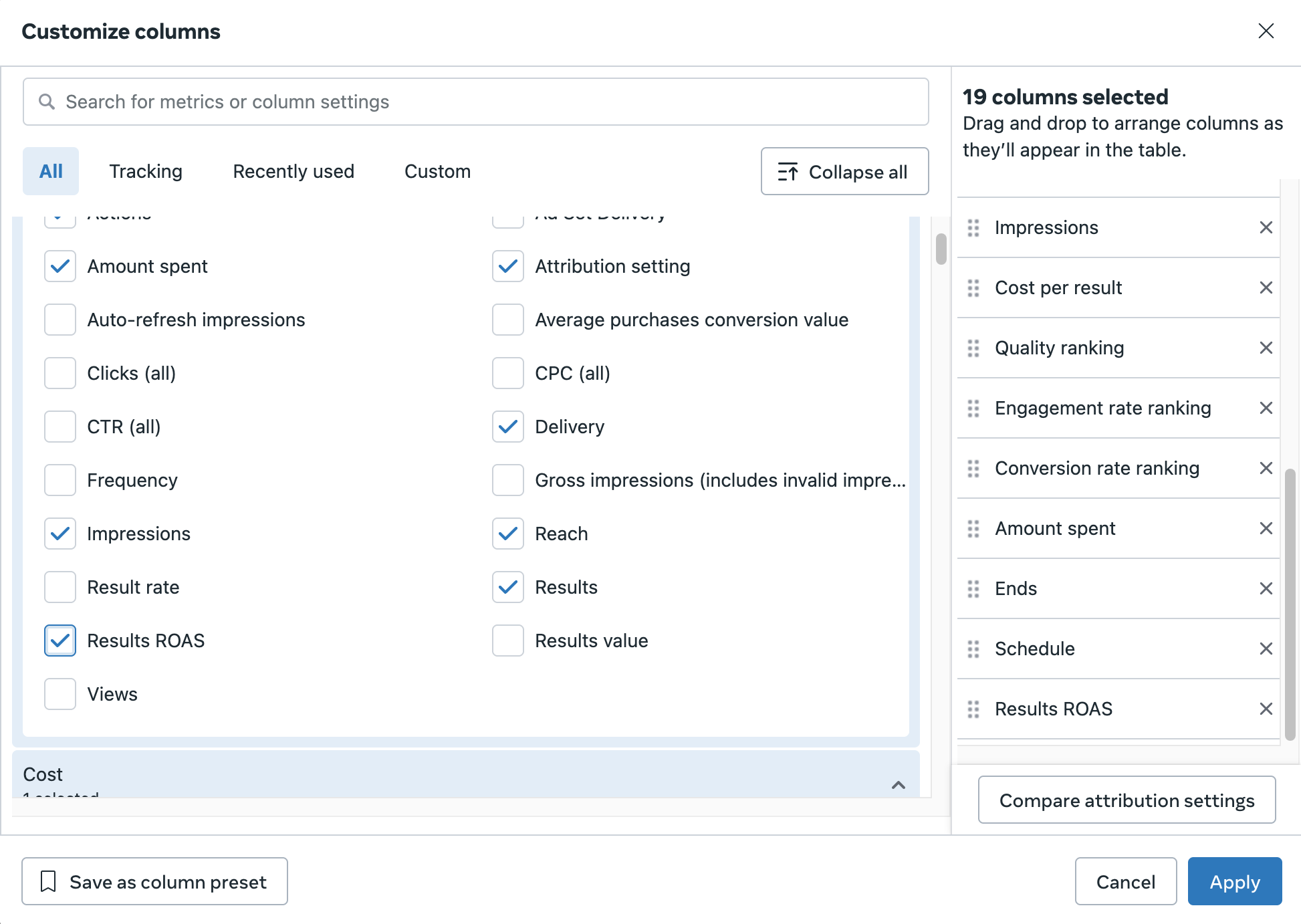
Forget all of them.
As a beginner, you only need to focus on one metric for now. This is the single golden number that tells you directly if your ad is making money or burning it: ROAS (Return On Ad Spend).
What does ROAS mean?
It is beautifully simple: for every dollar you spend on ads, how many dollars in sales do you get back?
The formula is straightforward:
ROAS = Total Revenue ÷ Total Amount Spent on Your Ad
Let’s use a quick example:
You spent $100 on ads today.
From that ad, you sold 5 products, and each product costs $60.
Your total revenue from the ad is: 5 x $60 = $300.
Your ROAS = $300 (Revenue) / $100 (Spend) = 3.
When someone asks for your ROAS and you say it is “3,” it means that for every $1 you spent on advertising, you brought back $3 in sales.
So, what is a good ROAS?
This is a question with no standard answer, because it depends completely on the profit margin of your product.
- ROAS less than 1: This is a major warning! You are spending more money than you are making back. You are actively losing money.
- ROAS of 2: Let’s say your product costs, shipping, and other fees add up to 50% of your sale price. A ROAS of 2 means you are breaking even (you spend $1, you make $2, but $1 of that is cost).
- ROAS greater than 3 or 4: For many businesses, this is a healthy level that allows for real profitability.
The most important thing you can do is calculate your own “Break Even ROAS” before you spend a single dollar. As long as your actual ROAS is higher than that number, you are profitable.
Lesson Summary
- Before you launch an ad, you must select a clear campaign objective.
- For selling products or services directly, the “Sales” (or “Conversions”) objective is your most valuable tool.
- The golden metric for measuring profitability is ROAS (Return On Ad Spend).
- ROAS = Total Revenue ÷ Total Spend. It shows how much you get back for every dollar you spend.
- You must calculate and know your product’s “Break Even ROAS.” This number is your lifeline for judging the success of an ad.
Time for a Crucial Calculation
This is a very important exercise, so please take a moment to think it through.
Let’s say your product’s sale price is $200. All of your costs (the product itself, packaging, shipping, etc., but not including ad spend) add up to $80. This means your gross profit on each sale is $200 - $80 = $120.
The question is: What is your break even ROAS? (Hint: How much ad spend would it take to perfectly cancel out your $120 gross profit?
Take a moment to think before you look at the answer below.
...
...
...
Answer:
The formula is: Break Even ROAS = Sale Price / Gross Profit.
So, for this product: $200 / $120 ≈ 1.67.
This means that as long as your ROAS is higher than 1.67, every sale you make is generating net profit. If your ROAS is below 1.67, you are losing money on each sale.
You have now learned all the essential theory and foundational logic! You are ready.
Starting in the next lesson, we will finally open the Meta Ads Manager. I will walk you through the interface and show you, step by step, how to set everything up. Let’s get ready for the most exciting part.
New ideas, straight to your inbox.
AI, engineering, and experiments. One or two useful emails a month.
No spam. Unsubscribe anytime.